
TL;DR:
- A structured client management workflow helps small businesses onboard, manage, and retain clients through clear phases and ownership. It reduces early client loss by ensuring consistent communication, timely actions, and effective handoffs. Automation supports administrative tasks, freeing time for critical interpersonal moments that strengthen relationships.
A client management workflow is the structured process you use to onboard, manage, and retain clients through consistent communication and coordinated tasks. For small business owners and directors across the UK, getting this process right is the difference between a client who stays for years and one who quietly disappears after 90 days. The best practices in client management are not reserved for large agencies. They are repeatable, teachable systems that any small business can build and run. This guide covers the key phases, tools, metrics, and implementation steps you need to build a workflow that holds up under pressure.

What is a client management workflow and why does it matter?
A client management workflow is a defined sequence of steps that moves a new client from contract signature through to active delivery and long-term retention. The term “client lifecycle management” is the recognised industry standard for this concept, and the two phrases describe the same structured approach. The workflow covers every touchpoint: the welcome message, the intake form, the kickoff call, the internal handoff, and the ongoing communication cadence.
The stakes are clear. Top-performing service businesses complete client onboarding in five days or fewer, while the bottom 20% lose 25–35% of clients within the first 90 days due to inconsistent processes. That figure is not a warning about bad service. It is a warning about the absence of a system. A structured workflow removes the guesswork from client management and replaces it with a process your whole team can follow.
For UK small businesses in particular, this matters because many operate with lean teams where one person handles sales, delivery, and client communication simultaneously. Without a documented workflow, the process lives in one person’s head. That creates a bottleneck that limits growth and puts client relationships at risk.
What are the essential phases of an effective client management workflow?
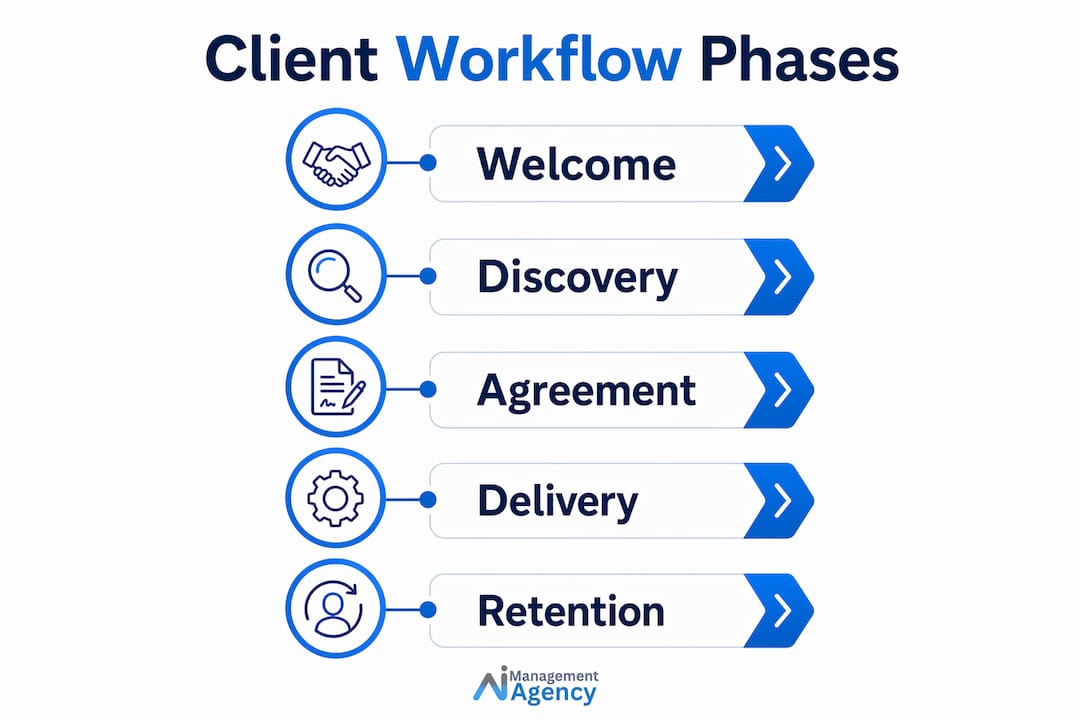
A well-built client management workflow moves through six core phases. Each phase has a clear purpose and a defined output.
-
Welcome. Send a welcome message within two hours of contract signature. Industry best practice confirms this timing sets a professional tone and gives the client clear next steps before doubt or confusion sets in.
-
Discovery and intake. Send a structured intake form to collect goals, preferences, access credentials, and key contacts. This is not a casual email. It is a formal document that feeds every subsequent phase.
-
Document and access collection. Gather logins, brand assets, and any third-party platform access. Test credentials immediately on receipt. Delayed credential testing is one of the most common causes of project delays in week two, and it is entirely preventable.
-
Kickoff call. Align on goals, timelines, and communication expectations. This call is the client’s first experience of your delivery team in action. It sets the tone for the entire relationship.
-
Internal handoff. Before or immediately after the kickoff call, hold a sync between your sales and delivery teams. This handoff meeting transfers the soft knowledge that never makes it into an intake form: the client’s communication style, their sensitivities, and any commitments made during the sales process.
-
Early check-ins. Schedule structured check-ins at days 14, 30, and 60. These are not catch-up calls. They are deliberate moments to confirm the client feels supported and that delivery is on track.
Pro Tip: Build your intake form in a tool that automatically triggers the next phase when submitted. This removes the manual step of chasing responses and keeps the workflow moving without human intervention.
The table below shows the output each phase should produce.
| Phase | Output |
|---|---|
| Welcome | Confirmation email with next steps sent within 2 hours |
| Discovery and intake | Completed intake form with goals and contacts |
| Document and access | Verified credentials and assets stored centrally |
| Kickoff call | Agreed timeline, milestones, and communication plan |
| Internal handoff | Briefed delivery team with full client context |
| Early check-ins | Documented client feedback and any adjustments made |
What tools support a client management workflow for small businesses?
The right tools remove friction from your customer interaction workflow without replacing the human moments that build trust. For UK small businesses, the choice broadly falls into two categories: purpose-built client portals and general project management platforms adapted for client work.
Purpose-built client portals give clients a single place to view progress, submit documents, and access communications. They reduce the volume of inbound “where are we up to?” emails significantly. Platforms like ClickCoach are designed specifically for professional service businesses and coaching practices, offering a single login that consolidates client records, session notes, and task tracking in one place.
General project management platforms offer broader flexibility but require more configuration to serve client-facing needs. The key features to look for in any tool include:
- Automated document request reminders so you are not chasing clients manually
- Centralised client records accessible to your full account team, not just the founder
- Progress dashboards that give clients real-time visibility without requiring a call
- Structured intake form builders with conditional logic
- Integration with your calendar and email for communication tracking
Automating document requests and reminders can recover up to 80% of the admin time currently spent on manual follow-ups. That time goes back into delivery and relationship management.
Pro Tip: Whatever platform you choose, store every piece of client information in a shared database from day one. If the founder is the only person who knows where things are, the business cannot scale.
How to implement a client management workflow in your small business
Implementation is where most small businesses stall. The workflow exists in theory but never gets embedded into daily operations. The following steps make it stick.
Assign clear ownership. Every phase of the workflow needs a named owner. “The team” is not an owner. Assign a specific person to send the welcome message, a specific person to review the intake form, and a specific person to run the internal handoff. Ambiguity is where workflows collapse.
Set communication rules. Decide how often you will contact clients, through which channel, and who is responsible. A weekly update email, a fortnightly check-in call, and a monthly report is a common cadence for project-based work. Write it down and share it with the client at kickoff.
Use structured intake forms. A well-designed intake form does three things: it collects the information you need, it signals professionalism to the client, and it sets expectations about what the client needs to provide. Generic email threads do none of these things reliably.
Run the internal handoff every time. The handoff between sales and delivery is not optional. The sales team knows things about the client that are not in any document. Skipping this step means your delivery team starts work with an incomplete picture, and the client notices.
Test credentials on receipt. The moment a client sends login details, test them. Discovering broken access in week two of a project creates delays that damage trust before delivery has even properly begun.
Common pitfalls to avoid:
- Relying on email threads as your system of record
- Sending welcome messages more than 24 hours after contract signature
- Skipping early check-ins because delivery feels on track
- Allowing the workflow to vary depending on who is managing the account
Pro Tip: Run a test onboarding with a fictional client before going live. Walk every step of the workflow yourself and note where it breaks or feels unclear. Fix those points before a real client experiences them.
What metrics tell you if your client management workflow is working?
Measuring your workflow is not optional if you want to improve it. The four metrics that matter most for UK small businesses are onboarding speed, early retention rate, client satisfaction scores, and communication response times.
-
Onboarding speed. Track the number of days from contract signature to the kickoff call. The target is five days or fewer. Businesses that hit this benchmark retain 25–35% more clients during the critical first 90 days than those relying on manual processes.
-
90-day retention rate. The first 90 days are the most fragile period in any client relationship. Track how many clients are still active and engaged at day 90. If this number is below your expectation, the problem is almost always in the onboarding or early check-in phases.
-
Client satisfaction at 120 days. Send a structured feedback survey around 120 days post-signature. This timing captures the client’s experience of both onboarding and early delivery, giving you a complete picture of where the workflow succeeds and where it fails.
-
Internal workflow adherence. Track whether your team is completing each phase on time. A real-time dashboard that shows the status of every active client onboarding gives you visibility without requiring a status meeting.
Review these metrics monthly. Adjust the workflow based on what the data shows, not on what feels right. If clients consistently report confusion after the kickoff call, the kickoff call needs a better structure. If credentials are regularly arriving late, the intake form needs a clearer instruction.
Key takeaways
A structured client management workflow, built around a five-day onboarding target and clear phase ownership, is the single most effective way for UK small businesses to reduce early client loss and build lasting relationships.
| Point | Details |
|---|---|
| Five-day onboarding target | Completing onboarding in five days or fewer retains 25–35% more clients in the first 90 days. |
| Phase ownership | Assign a named person to each workflow phase to prevent tasks falling through the gaps. |
| Internal handoff | A sales-to-delivery sync before kickoff transfers critical context that intake forms cannot capture. |
| Credential testing | Test client logins immediately on receipt to prevent delays that damage trust in week two. |
| 120-day feedback survey | Collect structured client feedback at 120 days to identify bottlenecks and measure satisfaction. |
What I have learned running client workflows for small businesses
The biggest mistake I see UK small business owners make is treating the client management workflow as a one-time setup task. They build it once, feel good about it, and then quietly abandon it when things get busy. The workflow only works if it runs every time, for every client, without exception.
The second pattern I notice is what I call the founder bottleneck. The business owner is the only person who knows where client information lives, who said what during the sales call, and what was promised in the proposal. Centralising client information and sharing it across the account team is not just good practice. It is the only way to grow without the founder becoming the single point of failure.
My honest view on automation is this: use it for the administrative tasks that do not require a human touch, and protect the moments that do. Automated reminders, intake forms, and progress dashboards free up your time for the conversations that actually build the relationship. The welcome call, the check-in at day 30, the honest conversation when something goes wrong. Those moments cannot be automated, and they should not be.
The businesses I have seen retain clients consistently are not the ones with the most sophisticated tools. They are the ones with the most consistent processes. Build the workflow, assign the owners, run it every time, and measure what happens. That is the whole formula.
— Geoff
How Aimagency helps UK small businesses manage clients more effectively
Building a consistent client management workflow takes time, and maintaining it takes discipline. Aimagency works with UK small businesses to put the repetitive, time-consuming parts of client communication on autopilot, without losing the personal touch that clients expect.
Aimagency’s AI agents handle inbound enquiries, answer frequently asked questions, and book qualified sales appointments around the clock. That means your client onboarding process starts the moment a prospect gets in touch, not the next morning when someone checks their inbox. For small business owners who want to compete on responsiveness and professionalism, the AI agent advantages are immediate and measurable. Speak to Aimagency to find out how an AI agent fits into your existing workflow.
FAQ
What is a client management workflow?
A client management workflow is a structured sequence of steps that moves a client from contract signature through onboarding, delivery, and retention. It defines who does what, when, and through which channel at every stage of the client relationship.
How long should client onboarding take?
Top-performing service businesses complete onboarding in five days or fewer. Businesses that exceed this timeframe risk losing 25–35% of new clients within the first 90 days.
What is the most common failure point in client workflows?
The most common failure point is the first 90 days, particularly when there is no structured internal handoff between sales and delivery teams. Missing this step leaves the delivery team without the full context they need to serve the client well.
When should I send a client onboarding feedback survey?
Send a structured feedback survey approximately 120 days after contract signature. This captures the client’s experience of both the onboarding phase and early delivery, giving you the most complete view of workflow performance.
How does automation fit into a client management workflow?
Automation handles administrative tasks such as document requests, intake form reminders, and progress tracking, recovering significant admin time while keeping human interaction focused on the moments that build trust and retention.
Recommended
- Customer enquiry workflow: a 2026 guide for UK smes – AI Management Agency
- Small business automation checklist for UK owners – AI Management Agency
- Call answering process guide for UK small businesses – AI Management Agency
- Step-by-step task automation guide for UK small businesses – AI Management Agency