Running a small hospitality business with just a handful of staff means every missed call is a lost booking. When you’re juggling front desk duties, kitchen coordination, and customer service, phone calls slip through the cracks. AI receptionists can tackle this problem head on, cutting missed calls by 70% and boosting bookings by 25%. This guide walks you through the prerequisites, setup steps, common pitfalls, expected results, and privacy considerations for deploying an AI receptionist tailored to your UK hospitality business.
Table of Contents
- Introduction And Prerequisites
- Step 1: Choose The Right AI Receptionist Solution
- Step 2: Set Up And Customize Your AI Receptionist
- Step 3: Test And Optimize Your AI System
- Common Mistakes And Troubleshooting
- Expected Results And Outcomes
- Privacy And Security Considerations
- Discover Tailored AI Receptionist Solutions For Your Hospitality Business
- Frequently Asked Questions
Key Takeaways
| Point | Details |
|---|---|
| Boost bookings significantly | AI receptionists increase appointment bookings by 25% within three months for small hospitality businesses. |
| Reduce missed calls drastically | Proper AI setup cuts missed calls by up to 70%, ensuring no customer inquiry goes unanswered. |
| Train AI thoroughly | Structured FAQs and hospitality scenarios lower fallback rates, improving customer experience and efficiency. |
| Comply with GDPR strictly | UK data privacy laws mandate encryption and transparency to avoid fines affecting over 60% of businesses. |
| Plan realistic timelines | Implementation takes 2 to 4 weeks, with measurable results appearing within 1 to 3 months. |
Introduction and Prerequisites
Before you deploy an AI receptionist, you need the right foundation. Technical requirements include a stable internet connection, booking software with API access, and compatible hardware like smartphones or computers. Gather structured FAQs covering common hospitality questions such as opening hours, menu options, booking policies, and cancellation terms. Budget between £500 and £2,000 depending on customization needs and integration complexity.
Understand what AI receptionists can and cannot do. They excel at handling routine inquiries, answering FAQs, and booking appointments through integrated systems. They struggle with highly nuanced requests or complex complaints requiring human empathy. Setting realistic expectations prevents disappointment and helps you design effective fallback protocols.
Data preparation is critical. Organize your FAQs, booking workflows, and escalation rules before setup begins. Poor data quality leads to high fallback rates, where the AI transfers calls to humans unnecessarily. Aim for comprehensive, clear training data to minimize these interruptions.
Key Prerequisites:
- Reliable internet connection with at least 10 Mbps upload speed
- Booking software with API access for seamless integration
- Budget allocation between £500 and £2,000 for setup and customization
- Structured FAQ library covering hospitality specific scenarios
- Basic understanding of AI capabilities and limitations
| Requirement | Details | Estimated Cost |
|---|---|---|
| Internet | Stable connection, 10+ Mbps upload | £30-£60/month |
| Booking software | API enabled system | £20-£100/month |
| AI receptionist platform | Subscription or one time fee | £500-£2,000 |
| Training data | Prepared FAQs and workflows | Time investment |
Pro Tip: Spend extra time organizing your FAQs by category (bookings, menu, policies) before setup. This structure reduces AI training time by up to 30% and lowers fallback rates significantly.
Step 1: Choose the Right AI Receptionist Solution
Selecting the right AI receptionist involves evaluating natural language processing quality, API compatibility, cost, and ease of customization. Natural tone matters immensely in hospitality. Customers expect friendly, conversational interactions, not robotic responses. Look for platforms that demonstrate human like conversation flow and contextual understanding.
API compatibility with your booking system is non negotiable. Verify that the AI platform integrates smoothly with your existing software before committing. Incompatible systems cause weeks of delay and frustration. AI receptionist solutions for hospitality often include pre built integrations with popular booking platforms used by restaurants, hotels, and small hospitality businesses.
Cost effectiveness is crucial for small businesses. Platforms offering tiered pricing allow you to start small and scale as bookings grow. Avoid solutions with hidden fees for API calls or customer interactions. Transparency in pricing prevents budget overruns.
Customization capability determines how well the AI reflects your brand voice. Choose platforms that let you adjust tone, vocabulary, and response templates. Selection criteria focus on natural tone, hospitality specific features, API compatibility, and cost effectiveness. Some solutions provide hospitality specific templates that reduce setup time.
| Platform Feature | Importance | What to Look For |
|---|---|---|
| Natural language processing | Critical | Human like conversation, contextual understanding |
| API integration | Essential | Compatible with your booking software |
| Cost | High | Transparent pricing, £500-£2,000 range |
| Customization | Important | Adjustable tone, response templates |
| Hospitality focus | Beneficial | Pre built templates for restaurants, hotels |
Key Selection Criteria:
- Natural language processing that handles UK accents and colloquialisms
- Confirmed API compatibility with your booking system
- Pricing within £500 to £2,000 for initial setup and first year
- Easy customization interface for non technical users
- Hospitality specific features like menu FAQs and booking workflows
Pro Tip: Request a demo call with the AI receptionist before purchasing. Test its ability to handle your specific FAQs and booking scenarios. This trial run reveals gaps in natural language understanding and integration capability.
AI selection criteria examples and small business AI solutions across industries provide useful benchmarks for evaluating platforms.
Step 2: Set Up and Customize Your AI Receptionist
Deployment typically spans 2 to 4 weeks, depending on data preparation and integration complexity. Deployment timelines typically range from 2 to 4 weeks, including training AI with business specific data. Start by installing the AI platform and connecting it to your phone system and booking software. Most providers offer step by step guides or onboarding support.

Train your AI with your prepared FAQs and hospitality scenarios. Upload documents, paste text, or use the platform’s training interface to input common questions and desired responses. The more comprehensive your training data, the lower your fallback rate. Aim for at least 50 to 100 FAQ pairs covering bookings, menu items, policies, hours, and location details.
Configure booking workflows carefully. Define how the AI should collect customer information (name, phone, date, time, party size), confirm availability, and finalize appointments. Test each step to ensure smooth handoffs to your booking system. Set up escalation protocols for scenarios the AI cannot handle, such as special event bookings or complex dietary requests.
Customize the AI’s tone and language to match your brand voice. If your business is casual and friendly, program the AI to use conversational phrases. If you’re more formal, adjust vocabulary accordingly. Consistency in tone builds customer trust and reinforces your brand identity.
Monitor interactions closely during the first two weeks. Review call logs, customer feedback, and fallback rates daily. Identify patterns where the AI struggles and refine training data accordingly. Regular fine tuning during this initial phase prevents long term issues.
Setup Steps:
- Install AI platform and connect to phone system
- Integrate AI with booking software via API
- Upload and train AI with 50 to 100 FAQ pairs
- Configure booking workflows including data collection and confirmation
- Set escalation protocols for complex inquiries
- Customize AI tone to match brand voice
- Test all workflows and integrations thoroughly
- Monitor and refine based on initial interactions
Pro Tip: Create a “test customer” persona and run through your most common booking scenarios. This hands on testing reveals gaps in AI training before real customers encounter them.
Training your AI receptionist, optimizing AI responses, and customizing AI for hospitality require ongoing attention, but front loaded effort pays dividends in lower fallback rates and higher customer satisfaction.
Step 3: Test and Optimize Your AI System
Once deployed, testing and optimization become ongoing priorities. Monitor fallback to human agent rates closely. Fallback rates above 20% indicate insufficient training or overly complex scenarios. Monitoring fallback rates and customer satisfaction scores is key to iterative AI improvements. Aim to keep this metric below 20% for efficient AI operation.
Collect customer feedback actively. Use post call surveys or follow up emails to gauge satisfaction with AI interactions. Low satisfaction scores pinpoint specific areas needing improvement, such as tone, response accuracy, or booking process clarity.
Analyze call transcripts and interaction logs weekly during the first three months. Identify recurring questions the AI handles poorly and update training data accordingly. Natural language processing improves with more examples, so feeding real world interactions back into training enhances performance.
Verify booking API integration reliability. Check that appointments appear correctly in your booking system, confirmation emails send promptly, and cancellations process smoothly. Integration errors frustrate customers and undermine trust in your AI receptionist.
Optimization Tactics:
- Review fallback rates weekly, targeting below 20%
- Collect customer feedback via surveys and analyze trends
- Update AI training data based on call transcripts and errors
- Test booking workflows end to end monthly
- Monitor response accuracy for hospitality specific FAQs
| Metric | Target | Action if Below Target |
|---|---|---|
| Fallback rate | Below 20% | Add training examples for common escalations |
| Customer satisfaction | Above 4/5 | Refine tone, improve response accuracy |
| Booking success rate | Above 90% | Fix API integration, simplify workflows |
| Response accuracy | Above 95% | Update FAQs, add hospitality context |
Pro Tip: Schedule a weekly 30 minute review session to analyze AI performance metrics and customer feedback. Consistent attention during the first three months establishes a solid foundation and prevents small issues from becoming systemic problems.
Optimizing AI receptionist responses and avoiding high AI fallback rates require diligence but deliver measurable improvements in efficiency and customer experience.
Common Mistakes and Troubleshooting
Inadequate AI training is the most frequent pitfall. Skimping on FAQ preparation leads to fallback rates as high as 40%, frustrating customers and overwhelming staff. Poor AI training causes fallback rates up to 40%, harming efficiency and customer experience. Invest time upfront to build comprehensive training data covering diverse customer scenarios.
Over automation without human fallback options backfires. Customers encountering dead ends or unhelpful loops abandon bookings. Studies show over automation can drop satisfaction by 20%. Always provide clear escalation paths to human agents for complex or sensitive inquiries.
Ignoring API compatibility during platform selection causes weeks of delay. Small businesses cannot afford extended downtime or manual workarounds. Verify compatibility before purchasing and test integrations thoroughly during setup.
Neglecting UK GDPR compliance risks significant fines. Over 60% of small UK businesses fail to handle AI data properly, exposing themselves to penalties. Ensure your AI platform encrypts data, limits retention periods, and provides transparent privacy policies.
“Many small hospitality businesses underestimate the importance of ongoing AI training. Initial setup is just the beginning. Regular updates based on real interactions keep fallback rates low and satisfaction high.”
Common Pitfalls to Avoid:
- Insufficient FAQ training data leading to 40% fallback rates
- Over automation without human escalation paths dropping satisfaction by 20%
- Ignoring API compatibility causing weeks of integration delays
- Neglecting GDPR compliance risking fines with 60% business non compliance
- Failing to monitor and refine AI performance after deployment
Pro Tip: Schedule quarterly AI training updates to incorporate new FAQs, seasonal menu changes, and evolving customer inquiries. This routine maintenance prevents performance degradation and keeps your AI receptionist relevant.
High fallback rate impact demonstrates why thorough training and balanced automation are non negotiable for successful AI receptionist deployment.
Expected Results and Outcomes
Properly implemented AI receptionists deliver measurable improvements within one to three months. Call analytics typically show a 70% reduction in missed calls, ensuring no inquiry goes unanswered. This dramatic improvement stems from 24/7 availability and instant response times that human staff cannot match.
Booking rates rise by approximately 25% within the first three months. Appointment bookings increase by 25% within 3 months of AI receptionist deployment. Customers appreciate the convenience of instant booking confirmation without waiting for staff availability. Reduced friction in the booking process converts more inquiries into confirmed appointments.
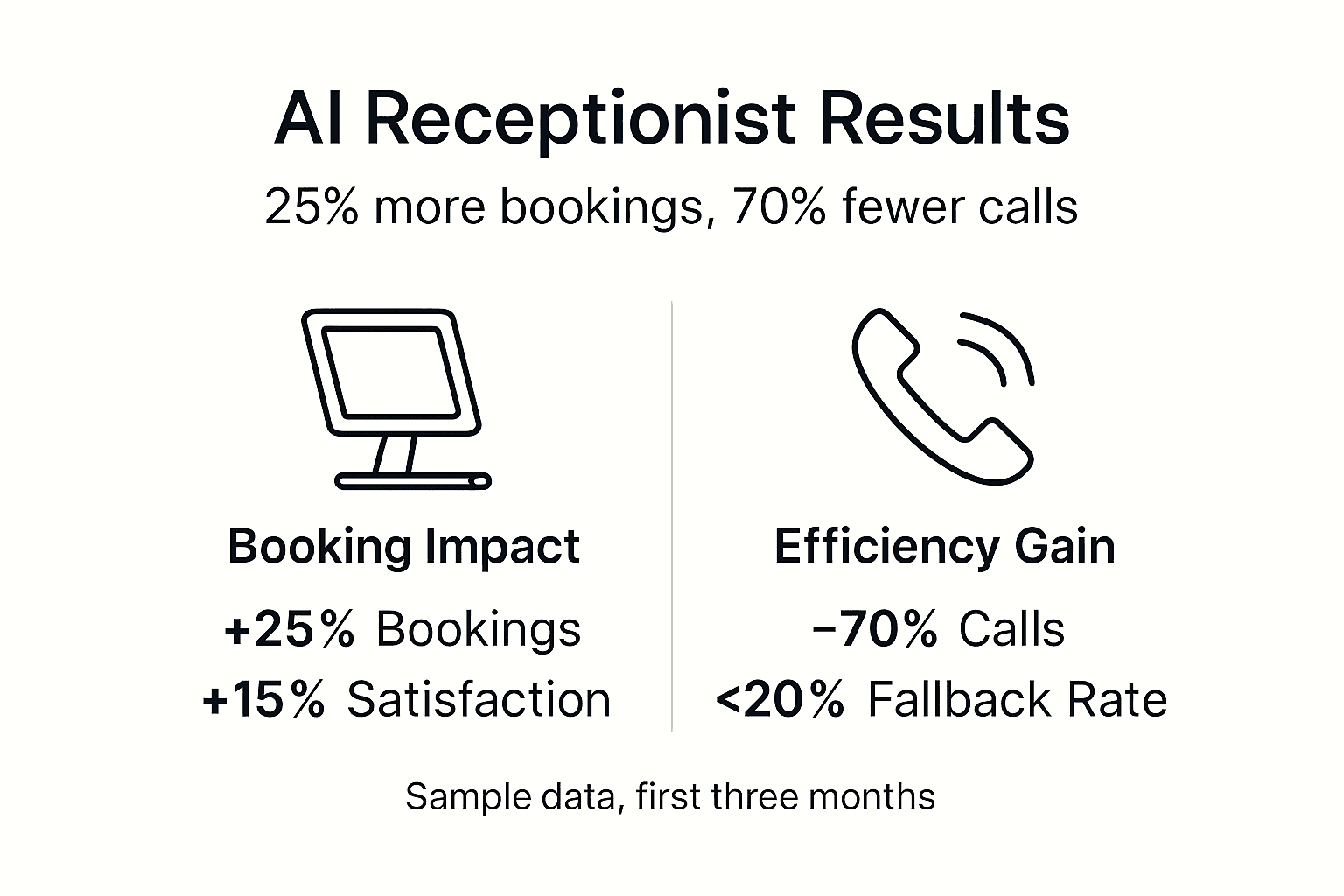
Customer satisfaction improves by 15% or more due to natural language processing enhancements. Friendly, conversational AI interactions feel less robotic and more personal. Customers value quick, accurate answers to common questions and seamless booking experiences.
Fallback rates typically drop below 20% after thorough training and optimization. This metric indicates effective AI training and balanced automation. Lower fallback rates free up staff to handle complex inquiries requiring human judgment and empathy.
Realistic timelines for measurable impact range from one to three months. Early results appear within weeks, but full optimization requires ongoing refinement based on real world interactions.
Typical Outcomes:
- 70% reduction in missed calls through 24/7 AI availability
- 25% increase in booking rates within three months
- 15% improvement in customer satisfaction scores
- Fallback rates below 20% indicating effective training
- Measurable impact within 1 to 3 months post deployment
70% Fewer Missed Calls: AI receptionists answer every inquiry instantly, eliminating the missed opportunities that plague small hospitality businesses with limited staff.
Booking rate improvements with AI demonstrate the tangible business value of well implemented AI receptionist systems for small hospitality businesses.
Privacy and Security Considerations
Strict adherence to UK GDPR rules is non negotiable for AI systems handling customer data. Over 60% of small UK businesses risk GDPR fines due to inadequate AI data handling. The Information Commissioner’s Office (ICO) provides comprehensive guidance on lawful data processing, transparency, and customer rights.
Implement encryption for all AI interactions, both in transit and at rest. Secure storage prevents unauthorized access to sensitive customer information like names, phone numbers, and booking details. Limit data retention periods to the minimum necessary for business operations, typically 6 to 12 months for booking records.
Create clear privacy policies informing customers about AI use and data protection measures. Transparency builds trust and fulfills legal requirements. Explain what data the AI collects, how it’s used, who has access, and how long it’s retained. Make privacy policies easily accessible on your website and booking platforms.
Regular audits and staff training ensure ongoing compliance. Review data handling procedures quarterly and update privacy policies as regulations evolve. Train staff on GDPR principles and escalation protocols for data subject requests.
“Small businesses often overlook GDPR compliance when deploying AI, assuming providers handle everything. You remain ultimately responsible for customer data protection. Partner with AI providers offering built in compliance features and conduct your own regular audits.”
Privacy Best Practices:
- Encrypt all customer data in transit and at rest
- Limit data retention to 6 to 12 months minimum necessary
- Create transparent privacy policies explaining AI data use
- Conduct quarterly audits of data handling procedures
- Train staff on GDPR principles and customer rights
- Partner with AI providers offering built in compliance features
Pro Tip: Choose AI receptionist platforms with built in GDPR compliance features like automatic data deletion, encryption, and audit logs. These features reduce your compliance burden and minimize risk.
UK GDPR compliance for AI provides detailed guidance on lawful AI deployment and data protection requirements for small UK businesses.
Discover Tailored AI Receptionist Solutions for Your Hospitality Business
Implementing an AI receptionist transforms how small hospitality businesses handle customer interactions and bookings. Professional AI receptionist solutions for restaurants streamline the entire setup process, from training to integration. 
AI Management Agency specializes in creating high quality AI agents that speak naturally, answer calls 24/7, respond to FAQs, and book qualified appointments. Seamless booking integration and customized training ensure your AI receptionist reflects your brand voice while delivering measurable results. AI call handling services and AI agent development services provide end to end support for small UK hospitality businesses ready to reduce missed calls and boost bookings.
Frequently Asked Questions
What is the typical cost to set up an AI receptionist for my small hospitality business?
Typical setup costs range from £500 to £2,000 depending on customization needs, booking system integration complexity, and training data volume. Affordable options exist specifically designed for small businesses with limited budgets. Monthly subscription fees typically range from £50 to £200 for ongoing platform access and support.
How long does it take to fully deploy and customize an AI receptionist?
Deployment and customization typically take between 2 and 4 weeks from initial setup to full operation. The timeline depends on training data completeness, booking system integration complexity, and how quickly you can test and refine workflows. Businesses with well organized FAQs and simple booking systems deploy faster.
How do I ensure my AI receptionist complies with UK data privacy laws?
Follow ICO guidelines strictly concerning data encryption, limited retention periods, transparent privacy policies, and customer rights. Over 60% of small businesses risk fines due to AI data mishandling. Regularly audit AI data handling procedures and update privacy policies as regulations evolve. Partner with AI providers offering built in GDPR compliance features to reduce your compliance burden and risk.
Can AI receptionists completely replace human staff in small hospitality businesses?
AI receptionists excel at handling routine FAQs and standard bookings but should always include human fallback options for complex inquiries. Balanced automation prevents up to 20% customer satisfaction drops linked to over automation. Human staff remain essential for nuanced situations requiring empathy, problem solving, and judgment. The ideal approach combines AI efficiency with human expertise.