
TL;DR:
- Building a virtual receptionist requires mapping caller needs and designing clear workflows before choosing technology.
- A reliable system relies on three core layers: telephony, AI processing, and integration, working seamlessly together.
A virtual receptionist is an AI-powered phone agent that answers calls, handles FAQs, books appointments, and routes enquiries automatically, without a human operator. Building one correctly means treating it as a workflow design problem first and a technology problem second. Building a virtual receptionist starts with mapping what your callers actually need, then assembling the right technology layers around those needs. For UK small business owners, a well-configured AI Voice Agent can answer calls 24/7, capture leads out of hours, and free your team from repetitive phone handling.
What call workflows should you define before building?
The single most important step in creating virtual receptionists is defining your call workflows before you touch any technology. Workflow design drives outcomes more than any platform choice. If you do not know what your callers want, no amount of AI sophistication will produce a good experience.
Start by listing your most common call reasons. For most UK small businesses, these fall into a handful of categories:
- New enquiries and lead capture
- Appointment bookings and rescheduling
- Pricing and service questions
- After-hours calls and voicemail
- Complaints or urgent escalations
For each call type, map the intended outcome. A new lead call should result in a name, number, and booked callback or appointment. A pricing question should trigger a scripted answer from your FAQ knowledge base. An urgent complaint should route immediately to a human.
Escalation paths are non-negotiable. Escalation triggers such as “press 0 for a human” are vital to caller satisfaction. Without a clear handoff route, frustrated callers hang up and do not return.
Pro Tip: Start with your 5–10 most common call types. Build and test those first before adding complexity. A tight, well-tested core workflow outperforms a sprawling one every time.
Which technology layers make up a virtual receptionist system?
A virtual receptionist system requires three core layers: telephony, AI processing, and logic or integration. Each layer has a distinct job, and they must work together cleanly.

| Layer | Function | Examples |
|---|---|---|
| Telephony | Receives and routes calls, manages phone numbers | Virtual phone numbers, call forwarding, SIP trunking |
| AI processing | Converts speech to text, understands intent, generates responses | Natural language understanding engines, voice synthesis |
| Logic and integration | Connects AI decisions to business tools | CRM writes, calendar bookings, automation hubs |
The telephony layer is where calls land. Virtual phone numbers give your business a professional presence without tying calls to a physical location. You can port an existing number or provision a new one, typically within one to seven business days.
The AI layer handles speech recognition and response generation. This is the component that makes the system sound natural rather than robotic. The quality of your scripting and knowledge base directly determines how well this layer performs.
The integration layer is where most setups fall short. Middleware automation hubs such as n8n or Make sit between your voice platform and downstream tools like your CRM or calendar. They prevent fragile direct integrations and handle structured data payloads reliably. Using a middleware layer means you can change one tool without rebuilding the entire system.
No-code platforms let you assemble these layers visually, with basic setups taking under 10 minutes for simple FAQ answering. Complex CRM field mapping and multi-step booking flows extend configuration to several hours. Custom development typically requires two to four weeks for full onboarding and configuration.
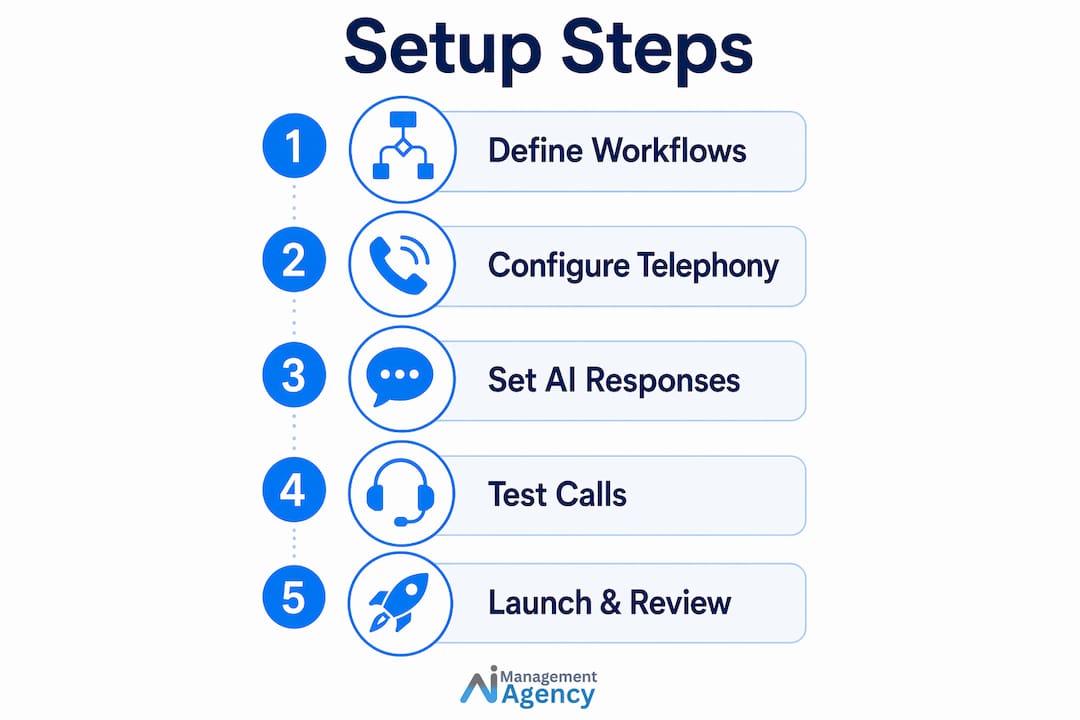
How to set up your virtual receptionist: step-by-step
A structured virtual receptionist setup follows a clear sequence. Skipping steps creates gaps that only surface when a real caller hits an edge case.
-
Provision or port your phone number. Choose a virtual number that matches your business location or use a national 03 number for a professional UK image. Understand that number porting adds one to seven business days to your timeline. Configure call forwarding rules so calls route to your AI agent by default.
-
Build your agent’s profile. Give the agent a name, a defined tone, and a greeting script. The greeting should state the business name, the agent’s name, and offer a clear first option. Tone should match your brand: a law firm sounds different from a plumbing company.
-
Create your knowledge base. Organise FAQs by specific topics such as pricing, opening hours, and service areas. Vague or incomplete source material produces vague answers. Write each FAQ entry as a direct question and a direct answer, not a paragraph of background.
-
Separate workflows from playbooks. Deterministic tasks and flexible FAQ answering should live in separate logic structures. Booking an appointment is deterministic: collect name, date, time, confirm. Answering “how much does it cost?” is flexible and needs a playbook. Mixing the two causes unreliable call handling.
-
Connect your integrations. Link your calendar so the agent can check availability and write confirmed bookings. Connect your CRM so new lead data writes automatically after every call. Use an automation hub as the middleware layer between your voice platform and these tools.
-
Configure after-hours handling. Set a clear schedule. Outside business hours, the agent should acknowledge the time, offer to take a message or book a callback, and confirm what happens next. Callers who know their message is captured are far less likely to call a competitor.
-
Test with realistic scenarios. Run at least 20 test calls covering your core workflows and deliberate edge cases: a caller who gives an unusual name, a caller who asks something outside your FAQ, a caller who goes silent mid-call.
Pro Tip: Record your test calls and listen back as if you were the caller. You will catch awkward pauses, missing escalation options, and FAQ gaps that look fine on paper but feel wrong in a real conversation.
The three core phases of setup are workflow definition, telephony and AI configuration, and live call testing. Budget 30–60 minutes for routing and initial testing on a no-code platform, and longer for custom builds.
You can also review how call routing works in practice to understand multi-team enquiry management before you finalise your routing rules.
What pitfalls should you watch for after launch?
The most common mistakes in building a virtual receptionist system happen after go-live, not during setup. The first 30 days are critical for catching issues before they affect real customers.
- Overcomplicated call flows. If callers need to navigate more than two or three options before reaching help, drop-off rates rise sharply. Simplify entry points and reduce menu depth.
- Missing escalation routes. Every call flow must have a human handoff option. Silence handling is equally important: configure explicit silence detection so the agent does not hang up on a caller who pauses to think.
- Incomplete knowledge bases. An agent that cannot answer a common question loses credibility fast. Review transcripts daily in the first month and add missing FAQ entries immediately.
- Integration failures. Verify that every booking actually writes to your calendar and every lead writes to your CRM. A booking that exists only in the AI’s memory is a missed appointment waiting to happen.
- Inconsistent tone. If your agent sounds confident on pricing but robotic on complaints, callers notice. Review the full script for tone consistency across all call types.
Configuring silence detection parameters explicitly prevents premature call drops and produces a more natural caller experience. This is a setting most first-time builders overlook entirely.
Pro Tip: Set a daily 15-minute transcript review for the first 30 days. Flag any call where the agent gave a wrong answer, missed an escalation, or the caller hung up early. Use those flags to update your FAQs and routing rules weekly.
Key takeaways
Building a virtual receptionist well requires workflow-first thinking, a clean three-layer technology stack, and continuous refinement in the weeks after launch.
| Point | Details |
|---|---|
| Workflow design comes first | Map your top call types and intended outcomes before selecting any platform. |
| Three layers are non-negotiable | Telephony, AI processing, and integration must all be configured correctly for reliable performance. |
| Separate workflows from playbooks | Deterministic tasks and flexible FAQ answering need distinct logic structures to reduce AI errors. |
| Test with edge cases | Run at least 20 test calls including unusual scenarios before going live. |
| Review transcripts daily post-launch | Daily monitoring in the first 30 days catches FAQ gaps and routing failures before they compound. |
What I have learned building AI receptionists for UK small businesses
The businesses that get the most from an AI Voice Agent are the ones that spend the most time on their call workflows, not their technology choices. I have seen setups built on sophisticated platforms underperform because the owner never sat down and listed their ten most common call reasons. The platform cannot compensate for that gap.
The second thing I would tell any UK small business owner is to write your agent’s script out loud. Read it as if you are the caller. You will immediately hear where the phrasing sounds unnatural or where a question goes unanswered. No amount of AI naturalness covers a script that does not make sense.
On the no-code versus custom build question: no-code is the right starting point for most small businesses. Get a working system live, collect real call data, and then invest in custom development for the specific integrations or workflows that the no-code platform cannot handle cleanly. Building custom from day one is expensive and slow when you do not yet know what your callers actually do.
Finally, UK callers have specific expectations around data handling. Make sure your agent’s greeting is transparent about the fact that calls may be recorded or handled by an automated system. This is both good practice and consistent with ICO guidance on automated processing. Callers who feel respected stay on the line longer and convert better.
— Geoff
How Aimagency builds AI receptionists for UK small businesses
Aimagency specialises in building and deploying AI Voice Agents for UK small businesses, handling everything from workflow design and telephony setup to CRM integration and ongoing performance monitoring.
If you want a system that answers calls 24/7, books qualified sales appointments, and handles your most common enquiries without a human operator, Aimagency builds it end to end. The team brings integration expertise across calendars, CRM platforms, and automation hubs, so your data flows correctly from day one. Read about the AI agent advantages built specifically for UK small businesses, or explore the AI receptionist service to see how a fully configured system works in practice.
FAQ
What is a virtual receptionist?
A virtual receptionist is an AI-powered phone agent that answers calls, responds to FAQs, books appointments, and routes enquiries automatically without a human operator.
How long does it take to build a virtual receptionist?
Basic setups take as little as 5–10 minutes on no-code platforms. Complex builds with CRM integration and custom workflows typically require several hours of active configuration, plus one to four weeks for custom development.
Do I need technical skills to set up a virtual receptionist?
No-code platforms require no coding knowledge and suit most small business needs. Custom development is only necessary for advanced integrations or highly specific call workflows.
How do I handle callers who want to speak to a human?
Every call flow must include a clear escalation path, such as a keypress option or a spoken trigger phrase, that transfers the caller to a human agent immediately.
What should I include in my virtual receptionist’s knowledge base?
Organise your knowledge base by specific topics such as pricing, opening hours, service areas, and booking policies. Each entry should be a direct question paired with a direct answer.
Recommended
- Intelligent virtual receptionist: UK small business guide – AI Management Agency
- Step by step AI receptionist guide for UK small businesses – AI Management Agency
- AI receptionists: the UK small business guide – AI Management Agency
- AI receptionists: better service, lower costs for small firms – AI Management Agency