
TL;DR:
- A customer enquiry workflow is a structured process guiding questions from initial contact to resolution and follow-up. Small UK businesses improve response times and compliance by building clear workflows supported by automation and GDPR practices. Recognizing common pitfalls and tailoring processes to business size ensures efficient and effective customer support.
A customer enquiry workflow is a structured, repeatable process that moves every incoming question from first contact through to resolution and follow-up. For small UK businesses, a well-built workflow is the difference between a prospect who converts and one who walks away frustrated. Without a defined inquiry management process, enquiries fall through the cracks, response times balloon, and GDPR compliance becomes a liability. This guide covers the five core stages, the right tools, response time benchmarks, UK data protection requirements, and how to tailor your client support system to your specific business size and sector.
What are the essential steps in a customer enquiry workflow?
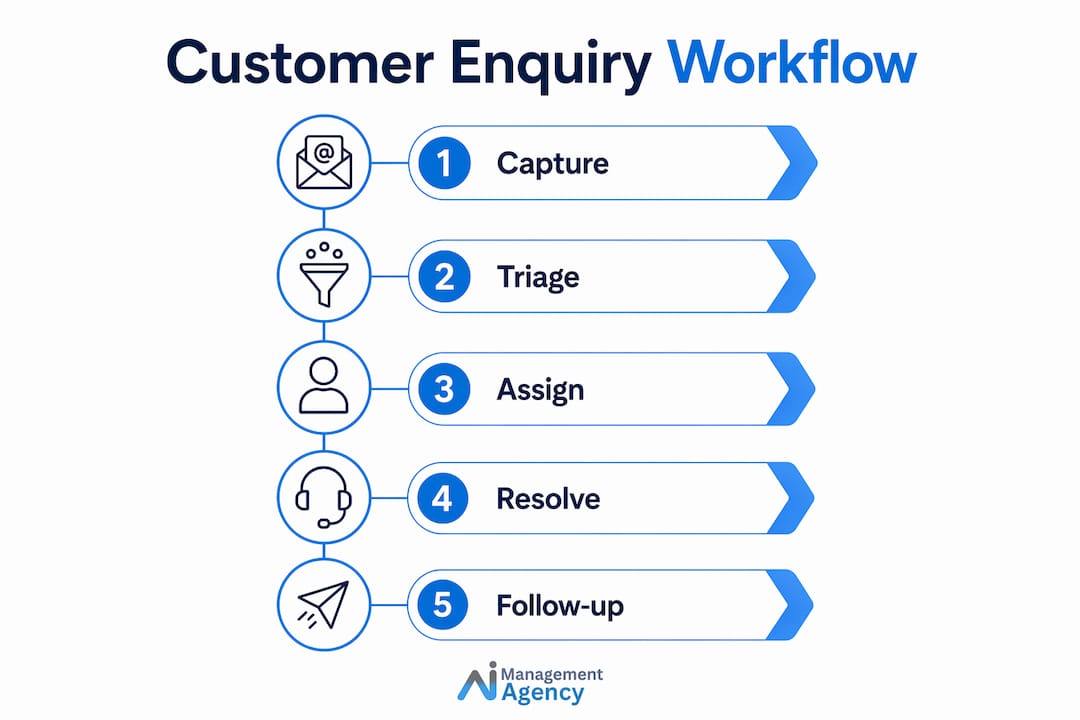
A 5-step enquiry process forms the backbone of every effective workflow: Capture, Triage, Assign, Resolve, and Follow-up. Each stage has a distinct purpose, and skipping any one of them creates downstream problems that cost time and money.
-
Capture — Collect enquiries from every channel: email, phone, live chat, social media, and web forms. A multi-channel capture strategy means no enquiry is missed regardless of how the customer chooses to contact you.
-
Triage — Sort incoming enquiries by urgency, type, and complexity. A plumbing business, for example, separates emergency call-outs from general pricing questions at this stage. Triage stops your team from treating a billing query with the same urgency as a safety complaint.
-
Assign — Route each enquiry to the right person or team. Auto-routing rules in tools like HubSpot, Freshdesk, or Zoho Desk can do this instantly based on keywords, customer tier, or enquiry type.
-
Resolve — Answer the enquiry accurately and completely. This is where context matters most. Agents who can see a customer’s order history or previous tickets resolve issues faster and with fewer follow-up questions.
-
Follow-up — Confirm resolution, request feedback, and close the loop. ISO 9001 standards expect organisations to document customer communication processes rather than treat them as ad hoc. A follow-up step satisfies that requirement and builds customer trust.
Pro Tip: Map your current enquiry flow on paper before choosing any software. Identifying where enquiries currently stall tells you exactly which stage needs the most attention.
How can you improve enquiry response speed and accuracy?
Speed is the metric customers notice first. 2026 benchmarks show that good teams target chat responses under 40 seconds and email replies under 2 hours. Excellent teams achieve under 20 seconds for chat and under 30 minutes for email. Those numbers represent a significant gap from the industry average of 1.5 minutes for chat and 8 hours for email, which means most small businesses have real room to improve.
Automation is the fastest route to closing that gap. Here is where to focus:
- AI triage and auto-routing — AI tools can read incoming enquiries, classify them by topic, and route them to the right agent without human intervention. AI automation reduces first response time by roughly 40% and handles high-volume routine enquiries instantly.
- Structured intake forms — A well-designed form collects the customer’s name, order number, issue type, and preferred contact method upfront. Structured intake forms reduce request-to-resolution time by 40–60% by eliminating the back-and-forth caused by incomplete information.
- Context enrichment — Link each incoming enquiry to your existing customer or order database. When an agent opens a ticket and immediately sees the customer’s purchase history, they skip the detective work entirely.
- Suggested replies — Tools like Freshdesk and Intercom surface pre-approved response templates based on the enquiry type. Agents send accurate answers faster without starting from a blank page.
Pro Tip: Integrate your enquiry intake form with your CRM from day one. Pulling existing customer data into a new ticket automatically is one of the highest-return improvements you can make to your call answering process.
The goal is not just speed for its own sake. Accuracy matters equally. An agent who responds in 20 seconds with the wrong answer creates more work than a 2-hour reply that resolves the issue completely. Speed and accuracy improve together when your workflow gives agents the right context at the right moment.

What UK legal considerations must your workflow include?
UK GDPR is not optional, and enquiry workflows are a direct point of data collection. Every contact form, chat transcript, and email thread captures personal data. That data must be handled lawfully from the moment it enters your system.
UK GDPR requires specific data retention schedules defined by purpose and issue resolution, not vague or indefinite storage. The practical implication is clear: once an enquiry is resolved and the relevant legal limitation period has passed, the data must be deleted.
Key compliance requirements to build into your workflow:
- Transparent consent — Your contact form must explain what data you collect and why. A simple privacy notice linked from the form satisfies this requirement.
- Separate marketing consent — Never bundle marketing opt-in with enquiry submission. GDPR requires a separate, unticked checkbox for marketing communications.
- Defined retention periods — Set deletion schedules in your CRM or helpdesk system. Tie them to issue resolution date plus the relevant legal limitation period, typically six years for contract-related matters in England and Wales.
- Purpose limitation — Data collected via an enquiry form cannot be repurposed for unrelated activities without fresh consent.
GDPR warning: Storing personal data indefinitely just in case is one of the most common compliance failures for small UK businesses. Retention periods must be tied to a specific purpose, not kept open-ended.
Without internal deletion mechanisms tied to data type and status, your workflow can be fast and efficient but still illegal under GDPR. The Information Commissioner’s Office can issue fines of up to £17.5 million or 4% of annual global turnover for serious breaches. Build compliance in from the start, not as an afterthought.
What are the common pitfalls when building an enquiry workflow?
Most small businesses do not fail at the concept of a workflow. They fail at the execution details. Recognising the common traps early saves significant time and frustration.
Scattered enquiries across channels — When phone calls land in one place, emails in another, and social media messages go unread for days, no workflow can function properly. A centralised platform like Freshdesk, HubSpot Service Hub, or Zoho Desk unifies all channels into a single queue.
Missing context causing repeated questions — Many teams underestimate how much time is lost chasing missing context rather than writing responses. Integrating enquiry intake with customer and order database references gives agents full context immediately and avoids re-asking the same questions.
No SLA alerts or performance tracking — Without service level agreement targets and alerts, bottlenecks go unnoticed until a customer complains. Set response time targets, track them weekly, and review them monthly.
Additional pitfalls to watch for:
- Undertrained staff — A workflow is only as good as the people using it. Short, practical training sessions on your chosen tools pay back quickly.
- No peak volume planning — Seasonal businesses, such as retailers in December or accountants in January, need a plan for high-volume periods. Pre-written responses and temporary routing rules help manage surges.
- Skipping the follow-up stage — Closing a ticket without confirming resolution with the customer leaves satisfaction unmeasured. A simple automated follow-up email asking “Was your issue resolved?” costs nothing and provides valuable data.
For practical guidance on managing call volumes as part of your workflow, the Aimagency guide on improving customer calls covers response benchmarks and communication best practices in detail.
How do you tailor your workflow to your small UK business?
No two small businesses have identical enquiry volumes, team sizes, or customer expectations. A sole trader running a trades business has different needs from a five-person e-commerce team. The right approach is to assess your current situation honestly before selecting tools or building processes.
Start by answering three questions: How many enquiries do you receive per week? Which channels do they arrive through? Where do they currently stall or get lost?
Once you have that picture, build a simple visual map of your ideal workflow using a free tool like Miro or even a whiteboard. Visual representations make it far easier to spot gaps and communicate the process to your team.
The table below compares common workflow approaches for small UK businesses at different stages:
| Approach | Best For | Key Tools | Automation Level |
|---|---|---|---|
| Manual with shared inbox | 1–5 enquiries per day | Gmail, Outlook shared mailbox | Low |
| Helpdesk with basic rules | 5–30 enquiries per day | Freshdesk Free, Zoho Desk | Medium |
| CRM-integrated workflow | 30+ enquiries per day | HubSpot, Salesforce Starter | High |
| AI Voice Agent + helpdesk | Mixed phone and digital | Aimagency AI agents, Freshdesk | Very High |
Start with the simplest approach that solves your current problem. Adding complexity before you need it creates confusion and reduces adoption. Review your workflow every quarter, gather feedback from your team and customers, and iterate based on what the data shows.
A support workflow guide for small teams from SendSync offers a useful external perspective on structuring enquiry processes for professional services firms with limited resources.
Pro Tip: If you handle enquiries by phone, consider an AI Voice Agent to answer calls 24/7, respond to FAQs, and book appointments. This single change can dramatically reduce missed enquiries outside business hours without adding headcount. Explore call automation options to see what fits your setup.
Key takeaways
A structured customer enquiry workflow built on the five-stage model, supported by automation and GDPR-compliant data practices, is the most reliable way for small UK businesses to improve response times and customer satisfaction.
| Point | Details |
|---|---|
| Use the five-stage model | Capture, Triage, Assign, Resolve, and Follow-up covers every enquiry from start to finish. |
| Target response benchmarks | Aim for chat under 40 seconds and email under 2 hours to meet 2026 industry standards. |
| Build GDPR compliance in | Set defined data deletion schedules in your system from day one, not as an afterthought. |
| Structured intake reduces waste | Intake forms that collect complete information upfront cut resolution time by 40–60%. |
| Match tools to your volume | Start simple with a shared inbox or basic helpdesk, then scale to AI automation as volume grows. |
Why most small businesses get this wrong before they get it right
I have worked with dozens of small UK businesses on their communication processes, and the pattern is almost always the same. The workflow exists in someone’s head, not on paper. The owner knows the process intuitively, but the moment a second person joins the team, consistency collapses.
The fix people reach for first is usually a new tool. They sign up for Freshdesk or HubSpot, spend a weekend configuring it, and then wonder why nothing has improved. The tool was not the problem. The missing piece was a defined process that the tool could support.
What actually works is spending 30 minutes mapping the current state before touching any software. Where do enquiries arrive? Where do they get stuck? Who is responsible at each stage? Answering those questions honestly reveals the real bottleneck, and it is almost never the tool.
The second thing I see consistently underestimated is the intake stage. Teams obsess over response speed but ignore the quality of information they collect upfront. A contact form that captures the customer’s name, issue type, and relevant reference number eliminates an entire round of clarification emails. That single change often has more impact than any automation investment.
Finally, GDPR compliance tends to be treated as a legal box to tick rather than a workflow design decision. The businesses that get it right embed deletion schedules and consent mechanisms directly into their systems from the start. The ones that get it wrong are the ones scrambling to audit their data after a complaint.
Start with the process. Then choose the tools. Then automate what is repetitive. That sequence works every time.
— Geoff
How Aimagency can transform your enquiry workflow
If your enquiry workflow is costing you leads, time, or compliance confidence, Aimagency builds AI agents that handle the heavy lifting for you. From AI receptionists that answer calls 24/7 in a natural tone to automated triage that routes enquiries to the right person instantly, the solutions are built specifically for small UK businesses.
Aimagency’s AI agents respond to FAQs, book qualified sales appointments, and integrate with your existing systems without requiring a large technical team to manage them. Whether you are a sole trader or a growing SME, the right AI agent reduces missed enquiries, cuts response times, and keeps your workflow GDPR-compliant. Explore the AI agent advantages built for small UK businesses and see how quickly the results show up.
FAQ
What is a customer enquiry workflow?
A customer enquiry workflow is a structured sequence of steps that moves an incoming customer question from first contact through to resolution and follow-up. The standard model covers five stages: Capture, Triage, Assign, Resolve, and Follow-up.
How fast should a small business respond to enquiries?
2026 benchmarks set the target at under 40 seconds for chat and under 2 hours for email. Achieving those times typically requires a combination of structured routing and automation.
Does GDPR apply to customer enquiry data?
Yes. Any personal data collected through a contact form, chat, or email is subject to UK GDPR. You must define a retention period, obtain clear consent, and delete data once the processing purpose is no longer valid.
Can AI handle customer enquiries for a small business?
AI automation can handle routine enquiries instantly and reduce first response times by roughly 40%. AI Voice Agents from providers like Aimagency answer calls 24/7, respond to FAQs, and book appointments without human intervention.
What is the biggest mistake businesses make with enquiry workflows?
The most common mistake is investing in tools before defining the process. A helpdesk or CRM cannot fix a workflow that has not been mapped and agreed upon first. Start with a clear process, then select the tools to support it.
Recommended
- Call answering process guide for UK small businesses – AI Management Agency
- How to improve customer calls for small UK businesses – AI Management Agency
- Ways to automate calls for UK small businesses – AI Management Agency
- Enhance customer service with AI: A guide for UK small businesses – AI Management Agency