
TL;DR:
- AI appointment scheduling automates booking, manages calendar availability, and reduces manual tasks for small businesses. Proper backend logic and transactional checks prevent double-bookings, while multi-channel reminders decrease no-shows. Leading tools like Gleantap and Pigee connect seamlessly to existing calendars, streamlining client communication and operation.
AI for appointment scheduling is the use of intelligent software agents to automate booking, manage calendar availability, and remove manual scheduling tasks from your working day. Tools like Gleantap, Pigee, and Scheduler AI now handle everything from confirming bookings to sending reminders, without a human lifting a finger. For small business owners, this shift from phone calls and back-and-forth emails to fully automated workflows is one of the most practical applications of AI available right now. The technology has matured quickly, and the barrier to entry is lower than most owners expect.
How does AI manage appointment availability?
The mechanics behind AI scheduling are more involved than most people realise. The Google Calendar API returns busy intervals only. It does not compute or expose free appointment slots. That distinction matters enormously for any AI agent built on top of it.

To generate available times, your AI system must take those busy intervals and subtract them from your defined working hours. It then applies your business rules, such as service duration, buffer times between appointments, and staff availability, to produce a list of bookable slots. Without this backend logic, the system cannot reliably tell a customer when you are free.
A further complication is the race condition problem. When two customers attempt to book the same slot simultaneously, double-booking risks emerge because the Google Calendar API lacks atomic slot reservation. The solution is to implement optimistic locking or transactional checks at the point of booking confirmation. This prevents two confirmed bookings landing in the same time slot.
The key principle here is determinism. Deterministic slot generation means your AI agent follows a fixed, repeatable set of rules every time it calculates availability. Inconsistent logic leads to overbooking or gaps that never get filled.
Pro Tip: Never treat Google Calendar as a direct availability oracle. Build or choose a scheduling tool that runs its own slot logic on top of calendar data, rather than relying on the calendar to tell you what is free.
The backend complexity is exactly why purpose-built AI scheduling tools outperform DIY integrations for most small businesses. Tools like Pigee and Gleantap have already solved these problems at the infrastructure level, so you do not have to.
What are the top AI scheduling tools for small businesses?
The AI scheduling market has grown considerably, and the best tools for small businesses share three qualities: they connect to existing calendars, they automate client communication, and they require minimal technical setup.
Here is a comparison of four leading tools:
| Tool | Automation level | Key integrations | Setup time | Best for |
|---|---|---|---|---|
| Gleantap | High | Google, Outlook, SMS, email, social | Moderate | Multi-location businesses |
| Pigee | High | WhatsApp, email | 10 minutes | Solo traders and small teams |
| Scheduler AI | Medium | Email, calendar | Low | Meeting-heavy professionals |
| Motion | High | Google, Outlook | Low | Complex personal schedules |
Gleantap books appointments automatically 24/7 across SMS, email, and social media messaging, with calendar sync to both Google and Outlook. It also lowers no-show rates through automated reminders and manages appointments across multiple locations and teams. For a business with more than one site or a team of staff, Gleantap handles the coordination that would otherwise fall to a receptionist.
Pigee takes a different approach, targeting speed of deployment. Its AI booking pages go live in 10 minutes and require no website or technical skill. Pigee integrates WhatsApp and email reminders, fills quiet days automatically, and sends personalised nudges to prompt regular clients to rebook. For a sole trader or small salon, that combination is genuinely useful.
Scheduler AI automates meeting coordination via email commands. It scans availability, confirms bookings through two-way conversations, and generates call summaries without manual follow-up. This suits service businesses where most appointments are arranged by email.
Motion and Reclaim sit at the more advanced end of the spectrum. Motion and Reclaim add intelligent prioritisation and rescheduling layers on top of existing calendars. Reclaim automatically moves lower-priority events to protect time for high-priority items. Motion automates scheduling tasks fully. Both are well suited to professionals managing complex, shifting schedules rather than straightforward client bookings.
- Gleantap: Best for businesses with multiple staff or locations needing centralised booking control.
- Pigee: Best for fast deployment with no technical overhead, particularly for WhatsApp-active clients.
- Scheduler AI: Best for email-driven appointment coordination with automatic follow-up.
- Motion: Best for professionals who need intelligent calendar prioritisation alongside booking.
What are the real benefits of AI appointment booking for small businesses?
Automated appointment booking removes the single biggest time drain in most service businesses: the back-and-forth of scheduling. AI scheduling tools increase productivity by reducing scheduling conflicts, time zone issues, and manual administrative tasks. That time goes back to you and your team.
The impact on no-shows is equally significant. Automated reminders sent via SMS, WhatsApp, or email keep appointments front of mind for clients. Gleantap’s reminder system, for instance, handles this across channels without any manual input. Fewer no-shows means more revenue from the appointments already in your diary.
Multi-channel booking also widens access for your clients. When a customer can book at 11pm via WhatsApp rather than calling during business hours, you capture appointments you would otherwise miss. Pigee’s WhatsApp integration is a direct example of this. Clients book when it suits them, not when your phone is staffed.
Pro Tip: Set up rebooking nudges for clients who have not returned within your typical service cycle. Tools like Pigee automate this, and it is one of the highest-return automations a small business can run.
Personalised client communication is the less obvious benefit. AI agents can reference a client’s last appointment, suggest relevant services, and address them by name. That level of personalisation, delivered automatically, builds the kind of relationship that keeps clients coming back. You can read more about AI appointment booking and how it applies across UK professional services.
How to implement AI scheduling in your small business
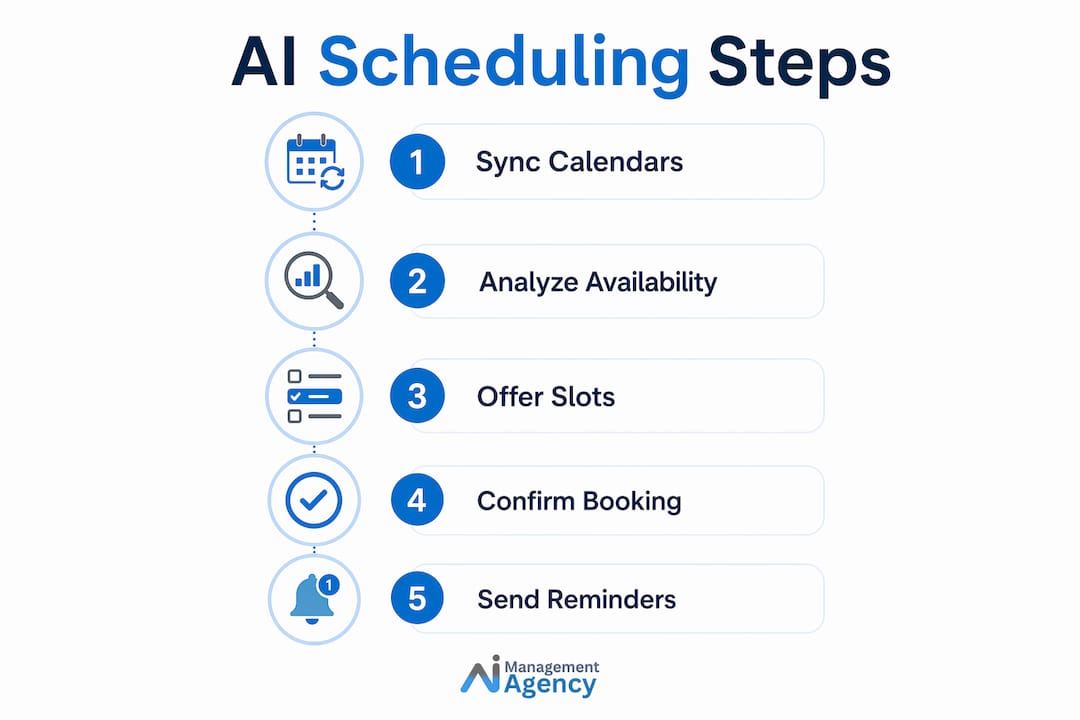
Getting the setup right from the start prevents the most common problems. Follow these steps to implement AI scheduling without disruption.
-
Sync your calendar accurately before going live. Integrating AI tools with Google or Outlook calendars reduces double bookings and keeps appointments synced across your team. Block out all existing commitments, holidays, and non-working hours before activating any AI booking system.
-
Define your working hours and service durations precisely. Your AI agent calculates availability from these parameters. Vague or incomplete settings produce incorrect slot offers. Include buffer times between appointments to allow for overruns or preparation.
-
Implement transactional booking checks. If you are building a custom integration, ensure your system uses transactional booking logic to prevent two clients booking the same slot simultaneously. Purpose-built tools like Gleantap and Pigee handle this internally.
-
Train your staff on the new workflow. Staff need to understand that the AI system manages bookings and that manual calendar edits must be made carefully. An unlogged change in the calendar can create gaps or conflicts the AI cannot see.
-
Inform your clients about the new booking process. A short message explaining how to book, whether via WhatsApp, email, or a booking page, reduces friction and increases adoption. Clients who understand the process use it consistently.
-
Review and adjust regularly. Check your booking data weekly for the first month. Look for patterns such as slots that never fill, high cancellation rates at certain times, or clients dropping off at a particular step. Adjust your settings accordingly.
For a practical walkthrough of AI scheduling for small UK businesses, Aimagency has published a detailed implementation guide covering common pitfalls and configuration tips.
Key takeaways
AI for appointment scheduling works best when backend slot logic, calendar sync, and automated client communication are all configured correctly from the start.
| Point | Details |
|---|---|
| Google Calendar does not show free slots | AI agents must subtract busy intervals from working hours to generate bookable times. |
| Double-booking requires active prevention | Use transactional checks or purpose-built tools to avoid race condition conflicts. |
| Tool choice depends on business type | Gleantap suits multi-location teams; Pigee suits solo traders needing fast deployment. |
| Automated reminders cut no-shows | Multi-channel reminders via SMS, WhatsApp, and email keep clients engaged and present. |
| Correct setup prevents most problems | Define working hours, buffer times, and service durations precisely before going live. |
Why most small businesses underestimate what AI scheduling actually involves
I have spoken with dozens of small business owners who assumed AI scheduling meant plugging in a tool and watching it work. The reality is more nuanced, and the gap between expectation and outcome is where most frustrations live.
The technical detail around Google Calendar’s API is a good example. Most owners do not know that the calendar returns busy times rather than free slots. They assume the AI reads their calendar and knows when they are available. It does not work that way without the right backend logic. When a business chooses a tool that has not solved this properly, they end up with double bookings or clients being offered times that are already taken.
What I find genuinely encouraging, though, is how far the better tools have come. Pigee’s ten-minute setup and Gleantap’s multi-channel automation represent a level of accessibility that simply did not exist a few years ago. The infrastructure problems have been solved. Small businesses no longer need to build anything from scratch.
The area I watch most closely is voice AI. The next evolution of automated appointment booking is a voice agent that answers calls, qualifies the caller, and books the appointment in a single conversation, without any human involvement. That capability exists now. Businesses that adopt it early will handle a significant volume of inbound enquiries at a fraction of the current cost.
The balance between automation and human touch remains worth thinking about. Automation handles volume. Humans handle exceptions and relationships. The best implementations I have seen keep a human in the loop for complex or high-value bookings, while letting the AI manage the routine ones entirely.
— Geoff
How Aimagency builds AI scheduling agents for UK small businesses
Aimagency specialises in building AI agents that answer calls, respond to enquiries, and book qualified appointments around the clock. The agents speak in a natural tone, handle common questions, and confirm bookings directly into your calendar without any manual input from your team.
For small business owners who want the benefits of automated appointment booking without the technical complexity of building it themselves, Aimagency handles the full setup. From calendar integration to client communication workflows, every element is configured for your specific business. Explore the AI agent advantages available to small UK businesses, or review the AI agent best practices guide to understand what a well-built system looks like before you commit.
FAQ
What is AI for appointment scheduling?
AI for appointment scheduling is the use of intelligent software agents to automate booking, manage calendar availability, and send client reminders without manual input. Tools like Gleantap, Pigee, and Scheduler AI are leading examples.
Does AI scheduling work with Google Calendar?
Yes, but with an important caveat. The Google Calendar API returns busy intervals rather than free slots, so any AI scheduling tool must run its own slot generation logic on top of calendar data to offer accurate availability.
How does AI reduce no-shows?
AI scheduling tools send automated reminders via SMS, WhatsApp, and email before each appointment. Gleantap, for example, manages this across multiple channels without any manual input, keeping clients informed and reducing cancellations.
Which AI scheduling tool is best for a sole trader?
Pigee is the strongest option for sole traders. Its booking pages go live in 10 minutes, require no website or technical skill, and integrate directly with WhatsApp for client communication.
What is the biggest risk when implementing AI appointment booking?
Double-booking is the most common risk, caused by race conditions when two clients attempt to book the same slot simultaneously. Choosing a tool with built-in transactional booking checks, or implementing optimistic locking in a custom build, prevents this.
Recommended
- AI appointment setting: a guide for UK small businesses – AI Management Agency
- AI appointment booking defined: UK business guide – AI Management Agency
- AI hotel appointment scheduling: boost efficiency 40%+ – AI Management Agency
- Uses of AI in SMEs: boost efficiency with smart tools 2026 – AI Management Agency