TL;DR:
- Implementing an AI receptionist in hotels involves selecting repetitive, rules-based tasks aligned with guest data, and ensuring smooth PMS integration before deployment. A phased rollout with comprehensive staff training, network segmentation, and escalation rules enhances system reliability and guest satisfaction. Human oversight remains vital, as AI handles routine inquiries, freeing staff for personalized guest interactions.
An AI receptionist for hotels is defined as an AI Voice Agent or automated messaging system that handles guest communication, answers calls around the clock, and manages front desk tasks without human intervention. Deploying one correctly transforms your operational efficiency and guest satisfaction in measurable ways. Platforms such as Akia and PolyAI are already live in UK properties, and the evidence is clear: hotels that integrate AI receptionists with their Property Management System (PMS) see faster response times, fewer missed calls, and staff freed to focus on high-value guest interactions. This guide walks you through exactly how to deploy an AI receptionist in hotels, from task selection through to live operation.
How to deploy an AI receptionist in hotels: start with task selection
The first decision you make determines whether your deployment succeeds or stalls. AI-addressable tasks are defined by four criteria: they are rules-based, pattern-repetitive, rely on data already held in your PMS or CRM, and their automation does not degrade the guest experience. Start there, not with the technology.
The most reliable method is a shift-level task log. Ask your front desk team to record their activities in 15-minute blocks across at least one full shift. This gives you an evidence-backed picture of where staff time actually goes, rather than where you assume it goes. The results typically surprise managers: a significant proportion of front desk time is consumed by a small number of repetitive enquiries.
Tasks that consistently qualify for AI receptionist deployment in UK hotels include:
- Guest messaging workflows: Pre-arrival confirmations sent two days before check-in, day-of arrival reminders, mid-stay check-in messages, and post-stay feedback requests
- FAQ responses: Wi-Fi passwords, parking instructions, breakfast times, local transport options, and check-out procedures
- Reservation confirmations and modifications: Straightforward booking amendments that reference existing PMS data
- Upselling prompts: Room upgrade offers or spa booking invitations triggered by arrival date proximity
- Inbound call handling: Answering calls 24/7 with scripted responses to the most common guest queries
Tasks involving billing disputes, safety concerns, or multi-system ambiguity should remain with human staff. The goal is a clear automation backlog, not blanket automation.
Pro Tip: Log your front desk tasks for a full week before speaking to any AI vendor. You will negotiate from a position of knowledge rather than assumption, and you will avoid being oversold on capabilities your operation does not yet need.
What system integrations are critical before going live?
Technical preparation is where most UK hotel managers underestimate the timeline. The most delay-prone step is not the AI platform configuration. It is obtaining and correctly configuring PMS API access. Budget for this taking longer than your vendor promises.

The table below summarises the key prerequisites and their purpose:
| Prerequisite | Why it matters | Typical lead time |
|---|---|---|
| PMS API credentials | Enables AI to read and write guest data in real time | 1 to 3 weeks |
| Network segmentation (VLANs) | Separates guest Wi-Fi, staff operations, and payment systems for PCI DSS compliance | 3 to 5 days |
| Messaging channel setup | Activates SMS, WhatsApp, or webchat for guest-facing communication | 2 to 7 days |
| Phone number provisioning | Assigns a dedicated number for AI call handling | 1 to 5 days |
| Knowledge base build | Compiles FAQs, property details, and brand tone for AI training | 3 to 7 days |
Network segmentation using VLANs for guest Wi-Fi, staff operations, and PMS or payment systems is a non-negotiable requirement for PCI DSS compliance. Your IT provider or managed service partner should configure firewall policies that control traffic flow between each segment. Do not skip this step to accelerate go-live.
Your knowledge base is equally important and often underestimated. Compile every FAQ your front desk currently answers verbally, your brand tone guidelines, and any property-specific information such as parking codes, restaurant menus, and local attraction recommendations. The quality of this document directly determines the quality of your AI’s responses from day one.
Pro Tip: Create a joint readiness checklist with your PMS administrator and your AI vendor before any configuration begins. A shared integration checklist prevents the most common cause of timeline slip: each party assuming the other has completed a prerequisite step.
How to execute the step-by-step deployment
With prerequisites confirmed, deployment follows a logical sequence. Rushing any stage creates problems that are harder to fix once the system is live.
- Confirm network infrastructure. Verify that VLANs are active, firewall rules are in place, and access points provide reliable coverage across all guest-facing areas. Test connectivity from the locations where staff will use the system.
- Create platform accounts and configure PMS integration. Log into your chosen AI platform, input your PMS API credentials, and run a test data pull to confirm guest records are accessible. Verify that reservation data, room types, and guest names display correctly.
- Configure messaging channels. Connect your SMS gateway, WhatsApp Business account, or webchat widget. Set up message templates for each automation trigger: pre-arrival, day-of arrival, mid-stay, and post-stay.
- Set escalation rules. Define the conditions under which the AI hands a conversation to a human. Escalation triggers should include negative sentiment detection, billing disputes, safety concerns, and low AI confidence scores. Assign a clear Service Level Agreement (SLA) for human response time.
- Install staff applications and run training. Your team needs to understand what the AI handles, what it escalates, and how to intervene when needed. Training does not need to be lengthy, but it must be specific.
- Soft launch with a subset of guests. Run the AI on a single room category or booking channel for the first two weeks. Monitor deflection rates (queries resolved by AI without human involvement) against escalation rates. Adjust confidence thresholds and response templates based on real interactions before full rollout.
The comparison below shows the difference between a soft launch approach and an immediate full deployment:
| Approach | Risk level | Time to stable operation | Recommended for |
|---|---|---|---|
| Soft launch (phased) | Low | 3 to 4 weeks | Most UK hotels |
| Full immediate deployment | High | 6 to 10 weeks | Large chains with dedicated IT teams |
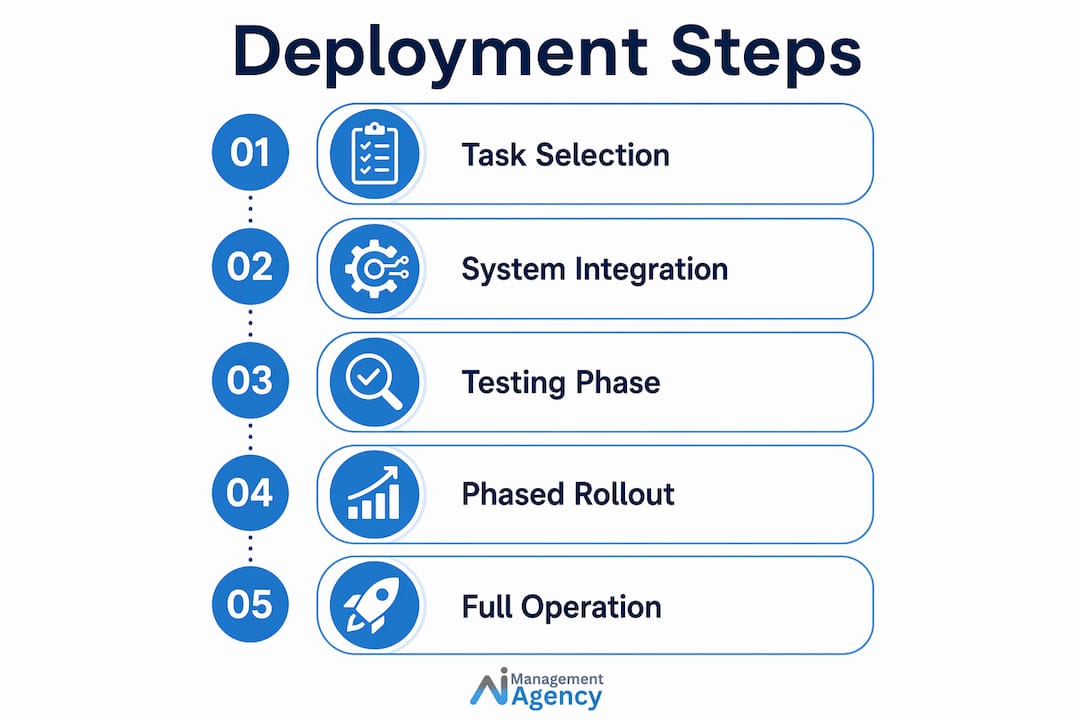
A phased rollout gives you real data before you commit the entire guest journey to automation. It also gives your staff time to build confidence in the system rather than feeling overwhelmed by it.
What challenges arise during deployment and how do you fix them?
Even well-planned deployments encounter friction. Knowing the most common failure points in advance keeps your project on track.
- PMS integration delays: Credential errors, webhook misconfigurations, and API rate limits are the most frequent causes. Resolve these by assigning a named technical contact at your PMS provider before the project starts, not after a problem appears.
- Staff resistance: Front desk teams sometimes interpret AI deployment as a threat to their roles. Address this directly and early. Explain which tasks the AI takes over and how that frees staff for guest interactions that require human judgement and empathy.
- Network reliability issues: An AI receptionist that drops connections during peak check-in periods damages guest trust faster than no AI at all. Test your network under load before go-live.
- Scope creep: Attempting to automate everything at once is the most reliable way to produce a poor outcome. Stick to your automation backlog and expand scope only after the initial tasks are performing reliably.
- Data privacy compliance: Confirm that your AI platform stores and processes guest data in accordance with UK GDPR. Request a Data Processing Agreement from your vendor before go-live.
The human-in-the-loop principle is not a concession to caution. It is a design requirement. Human oversight is valued not for warmth alone, but for its ability to restore guest confidence and resolve situations that span multiple systems. Build your escalation paths before you need them.
“The hotels that get the most from AI receptionists are not the ones that automate the most. They are the ones that automate the right things and keep humans in the loop for everything else.”
Key takeaways
Deploying an AI receptionist in hotels requires task selection grounded in real shift data, PMS integration completed before any platform configuration begins, and escalation rules that keep human staff in control of complex guest situations.
| Point | Details |
|---|---|
| Start with a task log | Record front desk activity in 15-minute blocks to build an evidence-backed automation backlog. |
| Prioritise PMS integration | Obtain API credentials early; this step causes the most deployment delays. |
| Segment your network | Configure VLANs for guest Wi-Fi, staff operations, and payment systems to meet PCI DSS requirements. |
| Use a soft launch | Deploy to a subset of guests first to calibrate confidence thresholds before full rollout. |
| Design escalation rules | Define triggers for human handover, including negative sentiment, billing issues, and low AI confidence. |
The human question is the one most managers get wrong
Working with UK hotels on AI receptionist deployments, I have seen the same anxiety surface repeatedly: “Will staff think we are replacing them?” The honest answer is that some will, regardless of what you say. What changes their minds is not reassurance. It is evidence.
When front desk staff see the AI handling the twentieth “What time is breakfast?” call of the morning, their reaction shifts from suspicion to relief. The value of human support in hospitality is not in answering repetitive questions. It is in reading a guest who has had a difficult journey, resolving a room issue with genuine care, and making a recommendation that no FAQ database can replicate.
The managers who get this right treat AI deployment as a redeployment exercise, not a headcount exercise. They ask: “What do we want our team doing more of?” and then build the automation backlog around that answer. The result is staff who feel their skills are being used better, not replaced. For practical guidance on training your team alongside AI tools, the process is more straightforward than most managers expect.
My recommendation: involve your front desk team in the task logging exercise from the start. They know better than anyone which tasks drain their time and which ones they find genuinely rewarding. That knowledge makes your automation backlog more accurate and your staff more invested in the outcome.
— Geoff
How Aimagency helps UK hotels deploy AI receptionists with confidence
Aimagency specialises in building AI Voice Agents and automated reception workflows tailored specifically for UK hotels. From PMS integration and knowledge base build to escalation design and staff onboarding, the team handles the technical complexity so you can focus on your guests.
If you are ready to move from planning to live operation, the 2026 hospitality AI guide covers every stage of deployment in detail, with case studies from UK properties. For hotels specifically looking to reduce missed calls and automate inbound enquiries, explore the hotel call automation service to see how quickly a well-configured AI receptionist can be operational.
FAQ
What is an AI receptionist in a hotel?
An AI receptionist is an automated system, typically an AI Voice Agent or messaging bot, that handles guest calls, answers FAQs, and manages communication workflows 24 hours a day without human staff involvement.
How long does it take to deploy an AI receptionist?
A phased deployment typically reaches stable operation within three to four weeks. The most time-consuming element is PMS API integration, which can take one to three weeks depending on your system provider.
Which hotel tasks are best suited to AI receptionist automation?
Rules-based, pattern-repetitive tasks with available PMS data are the best candidates. These include pre-arrival messaging, FAQ responses, reservation confirmations, and inbound call handling for common guest queries.
Do I need to replace my PMS to use an AI receptionist?
No. Most AI receptionist platforms connect to existing PMS systems via API. The key requirement is obtaining API credentials from your PMS provider and completing integration testing before go-live.
How do I handle guest queries the AI cannot answer?
Configure escalation rules that transfer the conversation to a human staff member when the AI detects negative sentiment, a billing dispute, a safety concern, or a low confidence score. Define a clear response SLA for each escalation type.