
TL;DR:
- Running a small business requires managing multiple roles, which AI receptionists can streamline by handling calls, bookings, and FAQs around the clock.
- Careful planning, system integration, and tailored call flows ensure AI systems improve customer experience and reduce manual work.
- Blending AI with human support optimizes efficiency and maintains personal service, crucial for small UK businesses’ reputation.
Running a small business with a handful of employees means wearing multiple hats at once. When you are focused on a client meeting or a job on site, the phone rings and nobody is there to answer it. Following a step by step AI receptionist setup can change that entirely. An AI receptionist answers every call, handles bookings, responds to common questions, and qualifies leads around the clock, including weekends and bank holidays. This guide walks you through exactly how to plan, build, and launch an AI reception system that works for your business from day one.
Table of Contents
- Understanding your business needs and AI receptionist benefits
- Preparing systems and choosing the right AI receptionist provider
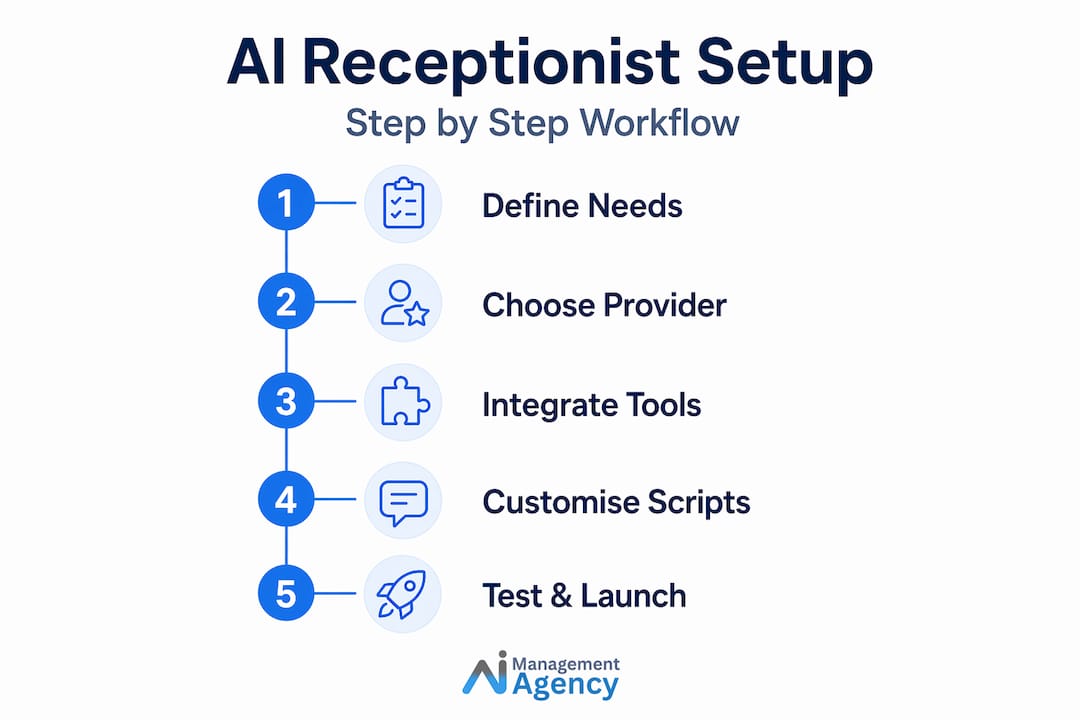
- Building and customising your AI receptionist: step-by-step setup
- Testing, launching and optimising your AI receptionist system
- Why combining AI with human touch is key for small business receptionists
- Enhance your small business with expert AI receptionist solutions
- Frequently asked questions
Key Takeaways
| Point | Details |
|---|---|
| Define clear business needs | Identify what tasks your AI receptionist should perform to ensure the system aligns with your goals. |
| Choose providers with integrations | Select AI receptionists that integrate seamlessly with your existing phone, CRM, and scheduling systems. |
| Customize and test thoroughly | Adapt greetings, call routing, and FAQs, then conduct tests before going live to ensure smooth operation. |
| Monitor and optimise | Continuously track performance and update AI knowledge to maintain high-quality customer service. |
| Combine AI with humans | Use AI for routine calls while keeping humans to handle complex queries for the best customer experience. |
Understanding your business needs and AI receptionist benefits
Before you configure a single setting, you need to know what you are asking the AI to do. This sounds obvious, but most small businesses skip it and end up with a system that frustrates callers rather than helping them. Clarity upfront saves you significant time later.
Start by listing every reason a customer might call you. Common categories include:
- Booking and appointment requests — new enquiries wanting to schedule a consultation or service
- FAQ calls — questions about pricing, opening times, location, or availability
- Lead capture — new prospects who have not yet decided to buy
- Call routing — callers who need to speak with a specific person on your team
- Complaints or urgent issues — situations requiring a human response
Once you have that list, you can see clearly which tasks an AI handles well and which need a person. Clear priorities like call routing and FAQs guide provider selection; integration reduces manual work. That is the foundation of any effective AI receptionist guide.
The operational benefits are real and measurable. Your AI receptionist works every hour of the day, including Christmas Day and August bank holidays. It never puts a caller on hold while juggling another task. It captures every enquiry in your CRM automatically, which means no more sticky notes or missed callbacks.
Pro Tip: Map your busiest call periods using your phone system’s call logs before you set anything up. If 60% of your calls arrive between 8am and 10am, configure your AI to prioritise routing at those times and let it handle routine calls the rest of the day.
Take a look at the UK small business guide to AI receptionists if you want to understand the full range of possibilities before committing to a provider.
Preparing systems and choosing the right AI receptionist provider
With your needs mapped out, you can now assess your current setup and choose a provider that fits. This step matters more than most guides admit. The wrong provider creates more admin work than it saves.
What to check before you start:
- Does your current phone number support call forwarding or SIP (Session Initiation Protocol, which lets phone calls travel over the internet)?
- Do you use a CRM such as HubSpot or Pipedrive? Confirm it has an open API or native integration with the AI platform you are considering.
- What calendar tool do you use? Google Calendar and Cal.com are the most widely supported options for real-time appointment booking.
- Do you have a dedicated business mobile or landline, or are calls coming to a personal number?
Integration with existing phone, CRM and scheduling tools is critical to smooth communication and reduces manual tasks. If your tools do not connect, your team ends up manually transferring data, which defeats the purpose.
When comparing providers, focus on these four factors:
| Feature | Why it matters |
|---|---|
| Natural language processing | The AI should understand accents, varied phrasing, and incomplete sentences |
| CRM and calendar integration | Eliminates manual data entry and syncs bookings automatically |
| Call routing flexibility | Lets you define who gets transferred and under what conditions |
| Customisable scripts and voice | Ensures the AI sounds like your business, not a call centre |
Avoid providers that lock you into rigid scripts or charge per-minute rates that scale unpredictably. Look instead for platforms with transparent monthly pricing and the ability to update your AI knowledge base yourself. You can see exactly what a well-built AI reception system looks like by reviewing AIM Agency’s AI receptionist features before you finalise your decision.
Building and customising your AI receptionist: step-by-step setup
Having prepared your systems and chosen a provider, now follow these detailed steps to build and launch your AI receptionist. This is where most business owners feel uncertain, but the process is more manageable than it looks.
-
Plan your call flows first. Draw out the decision tree on paper. What does the AI say on greeting? What options does it offer? What happens if the caller says nothing? Mapping this before touching any software saves hours of reworking.
-
Create your project in the AI platform. Most platforms use a drag-and-drop builder. Create a new project, name it clearly, and set the language to English (UK) to ensure the voice model uses British pronunciation.
-
Connect your phone number. Services like Twilio allow you to port an existing number or assign a new one. The AI platform connects to Twilio via API, meaning all incoming calls to your number route through the AI first.
-
Integrate your calendar. Connect Google Calendar or Cal.com so the AI can check your real-time availability and book appointments directly. Test this by having the AI attempt a booking into a blocked time slot to confirm it declines correctly.
-
Integrate your CRM. Map the data fields carefully. First name, phone number, and enquiry type should all capture automatically when a caller provides details. Check that duplicate contacts are handled correctly.
-
Write and load your scripts. Your greeting, FAQ responses, and handoff phrases should all reflect your brand voice. Avoid robotic phrasing. “Thanks for calling, I can get that booked for you right now” works better than “Your appointment request is being processed.”
-
Configure ring and routing settings. Set rings to 4 by default but adjust 0 to 10 based on your preference; allow exclusions so key contacts ring staff directly; multiple calls are handled simultaneously without busy signals. This is one of the most practical features for a small team.
-
Run a full test session. Call from multiple devices, try unusual questions, attempt a booking, and try hanging up mid-conversation. Note every failure point.
A detailed Voiceflow virtual receptionist tutorial is worth reviewing if you are building on that platform, as it covers call flow logic in depth.
Pro Tip: Record yourself roleplaying as three different types of caller before you write your scripts. An anxious first-time customer, a regular client, and an impatient enquirer all phrase questions differently. Writing scripts with those real voices in mind produces a far more natural AI conversation. The result is better service and measurable cost savings from day one.

Testing, launching and optimising your AI receptionist system
Once your system is built, it is vital to test thoroughly and optimise continuously for best results. Launching untested is the single biggest mistake small businesses make with new AI tools.
Pre-launch testing checklist:
- Call from a mobile, a landline, and a VoIP number to test audio quality across formats
- Ask the AI your ten most common customer questions and assess accuracy
- Attempt a booking, a cancellation, and a rescheduling request
- Test what happens when a caller does not respond or gives an unexpected answer
- Ask a friend or colleague who has not been involved in the setup to call and give honest feedback
After launch, your focus shifts to monitoring. Key metrics to watch include:
- Call completion rate — what percentage of calls reach a satisfactory outcome without human intervention
- Drop-off points — where in the call flow do callers hang up or ask to speak to a person
- Misunderstood phrases — most platforms log these; review weekly and update your scripts accordingly
- Booking conversion rate — how many enquiry calls result in a confirmed appointment
Continuous monitoring and updates ensure the system delivers long-term value as the business grows. Plan to review your AI knowledge base at least once a month. If your pricing changes, your opening hours shift, or you add a new service, update the AI that same day.
Pro Tip: Create a simple shared document where any staff member can flag a call that the AI handled badly. Review that document weekly. It becomes your most valuable source of improvement data, far more useful than any analytics dashboard.
The guide on optimising AI receptionists covers advanced tuning techniques once you have the basics running well.
Why combining AI with human touch is key for small business receptionists
Here is a perspective most AI implementation guides will not give you: pure automation is a risk, not just a feature.
An AI receptionist excels at predictable calls. Routine bookings, standard FAQ responses, lead capture. These are tasks where speed and consistency matter most, and AI wins every time. But the moment a caller has an unusual situation, an emotional complaint, or a nuanced question that falls outside the script, pure automation can make things worse. A caller who feels unheard will not just hang up. They will leave a review.
Blending AI with human support for routine and complex queries genuinely improves customer satisfaction. The businesses that get the most value from AI receptionists are the ones that design their systems with a clear handoff point. The AI handles the volume; your team handles the judgement calls.
For a small UK business, this matters even more than it does for a large company. Your clients often chose you specifically because you are not a faceless corporation. They want to know there is a real person available when it counts. A well-configured AI that routes complex queries to you instantly actually reinforces that personal reputation rather than diluting it.
The practical implication is this: do not try to make your AI handle everything. Design it to succeed at the things it is genuinely good at, and build clear, fast escalation routes for everything else. That is the setup that earns five-star reviews and repeat business. Learn more about the service and cost benefits of AI receptionists when this balance is properly achieved.
Enhance your small business with expert AI receptionist solutions
If this guide has shown you one thing, it is that the setup process has real complexity. Getting it right from the start saves weeks of troubleshooting.
At AI Management Agency, we build high-quality AI receptionist systems tailored specifically for UK small businesses with up to five employees. Our AI agents speak in a natural tone, answer calls 24/7, handle FAQs, and book qualified sales appointments directly into your calendar. We handle the full build, integration, and ongoing support so you can focus on running your business. Explore our AI receptionist solution to see how it works, review the benefits for small firms, or read our efficient AI answering service guide to go deeper on the topic. Book a free consultation and we will map out the right system for your business.
Frequently asked questions
What key features should I look for in an AI receptionist for my small business?
Look for natural language processing, integration with your CRM and calendar, call routing capabilities, 24/7 availability, and easy customisation to match your brand. Choose a vendor designed for small businesses with these capabilities built in rather than bolted on.
How many rings before the AI receptionist should answer calls?
Typically, four rings works well as a default, but the best platforms let you adjust from zero to ten rings and configure simultaneous call handling so no caller ever hears a busy signal.
Can AI receptionists handle calls during UK bank holidays?
Yes. AI receptionists operate 24/7 throughout the year, including all UK bank holidays, ensuring every customer call is answered regardless of when it comes in.
Will an AI receptionist replace my human receptionist completely?
It is not designed to. AI handles routine, predictable calls efficiently, but blending AI with human support ensures complex or sensitive calls receive the personal attention they deserve.
Recommended
- AI receptionists: the UK small business guide – AI Management Agency
- The real benefits of AI receptionists for UK businesses – AI Management Agency
- Efficient AI answering service guide for UK small firms – AI Management Agency
- AI receptionists: better service, lower costs for small firms – AI Management Agency