
TL;DR:
- Monitoring AI receptionists involves tracking task completion, escalation quality, response speed, and caller sentiment to ensure optimal performance. Regular reviews of call transcripts, structured testing, and appropriate tools help small UK businesses improve customer interactions and maintain system effectiveness. Prioritizing escalation handling and defining clear handoff rules are essential for building customer trust and achieving high satisfaction.
Monitoring AI receptionist performance means tracking specific metrics such as task completion, escalation quality, response speed, and caller sentiment to maintain optimal customer service. For UK small businesses, getting this right is the difference between an AI Voice Agent that pays for itself and one that quietly frustrates callers. This guide covers the exact performance indicators, tools, and review practices you need to assess AI receptionist effectiveness and keep your system performing at its best.
How to monitor AI receptionist performance: the core metrics
Knowing which numbers to watch is the foundation of any reliable evaluation. Without clear benchmarks, you are guessing rather than managing.
Task completion rate is the single most telling measure of how well your AI receptionist is working. Task completion of 70–80% indicates strong performance, while anything below 60% points to knowledge gaps or routing failures. High-performing platforms achieve around 78% completion; the weakest manage only 39%. That gap represents real callers who left without the help they needed.
Response speed matters more than most business owners expect. AI response targets sit at 0.5 to 1 second, with latency under 600 milliseconds for natural conversation flow. Callers notice delays even at the sub-second level, and sluggish responses signal poor service quality before a single word is exchanged.
Escalation and handoff quality is arguably the most critical metric of all. The AI must route calls to a human with full context, not just transfer a confused caller mid-sentence. Handoff quality is the metric that separates operationally fit systems from feature-heavy ones that fall apart under real conditions.
Sentiment analysis tracks caller frustration or satisfaction across calls, giving you a pattern view rather than a snapshot. Platforms that surface sentiment trends allow you to spot deteriorating caller experience before it shows up in reviews.
Here is a comparison of the key AI receptionist performance metrics with typical benchmarks:
| Metric | What it measures | Target benchmark |
|---|---|---|
| Task completion rate | Calls resolved without human intervention | 70–80% |
| Response latency | Time to first AI response | Under 600 milliseconds |
| Escalation accuracy | Correct routing with full context passed | Above 90% |
| Caller sentiment score | Positive vs. frustrated caller tone | Net positive trend |
| Call answer rate | Percentage of calls answered immediately | Near 100% |
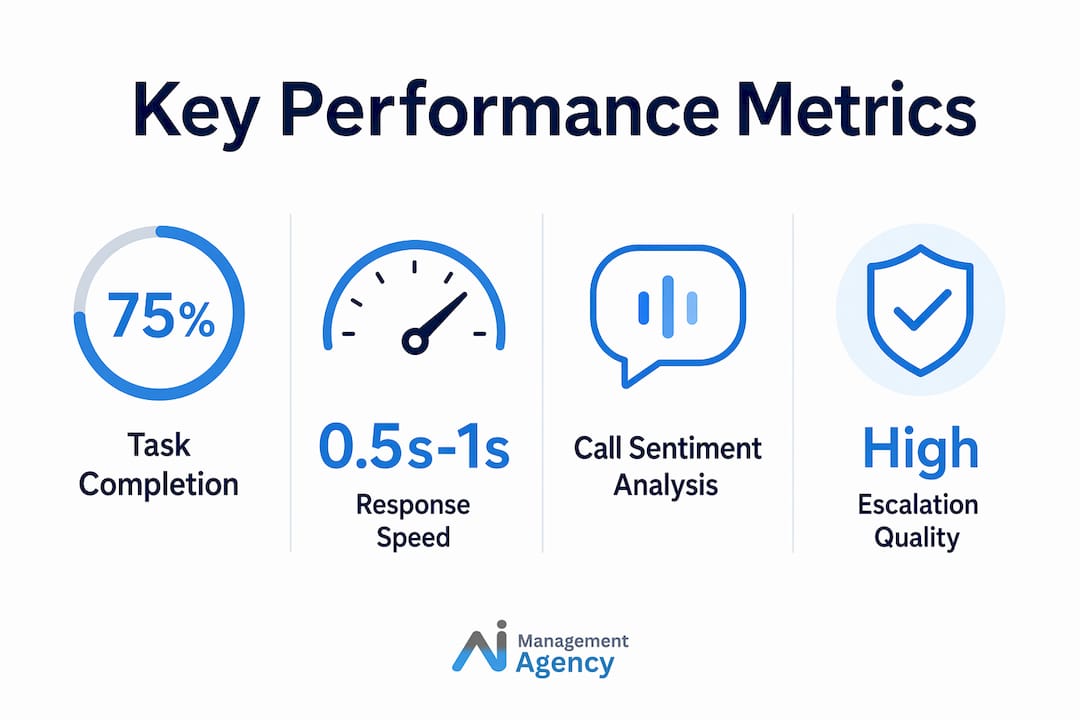
Tracking call answer rate and handling time alongside these figures gives you a complete picture of both responsiveness and efficiency, regardless of your industry.
Which tools enable effective AI receptionist monitoring?
The right monitoring tools turn raw call data into decisions you can act on. Choosing platforms with built-in analytics removes the guesswork from performance reviews.

Real-time analytics dashboards that segment by call intent, time period, and call type are the most practical starting point. Platforms such as Loman AI and GoTo Connect offer dashboards that surface containment rates, sentiment trends, and flow metrics in a single view. Containment rate tells you how many calls the AI resolved without any human involvement, which is a direct measure of operational efficiency.
Call recording and transcription are non-negotiable for any serious monitoring programme. Transcripts allow you to audit specific calls, identify where the AI gave incorrect information, and pinpoint the exact moment a caller became frustrated. Without transcripts, your review process relies on memory and guesswork.
CRM and calendar integration adds context to your monitoring data. When your AI receptionist connects to tools like HubSpot or a booking system, you can cross-reference call outcomes with actual appointments booked or leads captured. This turns monitoring from a quality-control exercise into a direct measure of business impact.
Key features to look for in a monitoring platform:
- Filtering by call intent, caller type, or time of day
- Automated alerts when sentiment scores drop or escalation rates spike
- Exportable transcripts for manual review and team training
- Integration with your existing CRM or scheduling software
- Audit logs that record every interaction for compliance and review
Pro Tip: Set up automated alerts for any session where the sentiment score drops below your defined threshold or where the escalation rate rises more than 10% week on week. Catching degradation early costs far less than recovering from a wave of negative caller experiences.
How to run test calls and regular reviews
Systematic testing is what separates businesses that improve their AI receptionist from those that simply hope it keeps working. A structured review process does not need to be time-consuming to be effective.
The three-call test framework is the most practical starting point for any new deployment or after a knowledge base update. The three scenarios to test are: a call in a noisy environment, a call with an unusual or off-script request, and a call involving an emotionally frustrated caller. Speech recognition accuracy drops 12–18% in noisy environments, and only 4 of 11 platforms tested correctly handled emotional escalation calls. Running these three scenarios yourself reveals gaps that polished demos never show.
Weekly transcript sampling is the most reliable method for ongoing improvement. Reviewing at least 10 call transcripts weekly produces steady task completion improvements of 1.5 to 2% per month. Businesses that maintained this discipline saw continuous performance gains for six months. That is a compounding return on a modest weekly time investment.
Here is a practical review workflow you can implement immediately:
- Pull 10 call transcripts each week, prioritising escalated and abandoned calls first.
- Flag any call where the AI gave incorrect information or failed to route correctly.
- Update the knowledge base with corrections before the next review cycle.
- Run the three-call test after every significant knowledge base update.
- Review escalation rules monthly to account for new products, services, or seasonal changes.
- Compare task completion rates month on month to confirm the trend is moving upward.
Before deployment, define your escalation rules clearly. Specify which call types must always reach a human: complaints above a certain severity, VIP clients, medical or legal queries, and any caller who explicitly requests a person. Businesses that skip this step create an AI that handles the wrong calls autonomously and transfers the wrong ones to staff.
Pro Tip: Start your monitoring programme with after-hours calls. These are lower-risk because caller expectations are slightly more forgiving, and they give you a clean data set to establish your baseline before you evaluate peak-hour performance.
For a practical deployment roadmap, the step-by-step AI receptionist guide from Aimagency covers the full implementation process for UK small businesses.
What challenges do UK small businesses face when monitoring AI receptionists?
Monitoring an AI receptionist in a real UK small business environment surfaces challenges that vendor documentation rarely mentions. Knowing them in advance saves considerable time and frustration.
Speech recognition accuracy is the most common pain point. Regional accents, background noise from busy premises, and callers speaking quickly all reduce recognition quality. This is not a reason to avoid AI receptionists. It is a reason to test with your actual caller profile before committing to a configuration. A system that performs well in a quiet demo environment may struggle in a busy trade counter or salon reception.
Overreliance on feature lists is a persistent mistake. Businesses that select AI receptionists based on operational fit rather than feature breadth consistently achieve better results. A system with 40 features but poor escalation handling will underperform a simpler system that routes calls correctly every time.
Defining escalation criteria is harder than it sounds. Many small businesses deploy their AI receptionist without clear rules for when the AI should hand off to a human. The result is either an AI that escalates too readily, making it no more efficient than a call-forwarding service, or one that holds callers in automated loops when they need a person.
Hybrid models combining AI and human agents see 23% higher customer satisfaction than fully automated approaches. This figure underlines the importance of getting the handoff balance right rather than pushing for maximum AI autonomy.
Remediation steps that consistently improve outcomes:
- Update your knowledge base every time a call reveals a gap, not just during scheduled reviews.
- Test with callers who have strong regional accents relevant to your customer base.
- Define escalation triggers in writing before deployment and revisit them monthly.
- Monitor after-hours performance separately from peak hours to identify time-specific issues.
- Treat low sentiment scores as an immediate action item, not a metric to note and move on from.
For context on how these challenges play out in a specific trade context, the AI receptionist for electricians case from Aimagency illustrates how real-world monitoring and adaptation work in practice.
Key takeaways
Effective AI receptionist monitoring requires consistent tracking of task completion, escalation quality, and caller sentiment, combined with weekly transcript reviews and structured test calls.
| Point | Details |
|---|---|
| Task completion is the top metric | Aim for 70–80% completion; below 60% signals knowledge or routing problems. |
| Response speed affects perception | Target latency under 600 milliseconds to maintain natural, satisfying caller interactions. |
| Weekly reviews compound results | Reviewing 10 transcripts weekly improves task completion by 1.5–2% each month. |
| Escalation rules must be defined first | Set clear handoff criteria before deployment to avoid both over-escalation and frustrated callers. |
| Hybrid AI and human models outperform | Combining AI autonomy with defined human handoffs produces 23% higher customer satisfaction. |
Why escalation quality is the metric most businesses get wrong
Most monitoring guides focus on task completion and response speed because they are easy to measure. My experience working with UK small businesses tells a different story. The metric that actually determines whether an AI receptionist builds or damages customer relationships is escalation quality.
A business can have a 78% task completion rate and still generate complaints, if the 22% of calls that need a human are handled badly. Callers who are transferred without context, or who repeat their problem to three different people, remember that experience. They do not remember the 78% of calls that went smoothly.
The businesses I have seen get the most from their AI Voice Agent are not the ones obsessing over dashboards. They are the ones who spent time before launch writing out exactly which situations require a human, and then tested those scenarios repeatedly. They also review escalated calls first during weekly sampling, not last.
There is also a broader point worth making about UK customer expectations. British callers tend to be more tolerant of automation for routine queries but noticeably less forgiving when they feel they cannot reach a person when it matters. Getting escalation right is not just a technical configuration. It is a statement about how much you value the caller’s time.
If you are just starting out, the UK small business guide to AI receptionists is worth reading before you configure your first escalation rule.
— Geoff
See how Aimagency supports AI receptionist performance for UK businesses
Aimagency specialises in building and managing high-quality AI Voice Agents for UK small businesses, including AI receptionists that answer calls 24/7, handle FAQs in a natural tone, and book qualified sales appointments. Beyond the initial build, Aimagency supports ongoing monitoring, knowledge base updates, and escalation optimisation so your system keeps improving rather than drifting. If you want to understand the full commercial case before committing, the AI agent advantages page sets out exactly what small UK businesses gain from a well-managed AI receptionist. Book a consultation with Aimagency to discuss your specific monitoring needs and get a clear plan for sustained performance.
FAQ
What is a good task completion rate for an AI receptionist?
A task completion rate of 70–80% indicates strong AI receptionist performance. Rates below 60% suggest knowledge gaps or routing problems that need immediate attention.
How often should I review AI receptionist call transcripts?
Weekly reviews of at least 10 call transcripts produce the most consistent improvement. Businesses that maintain this cadence see task completion rates rise by 1.5 to 2% each month.
Why does escalation quality matter more than feature count?
Businesses that prioritise operational fit and escalation handling over feature breadth consistently achieve better results. A system that routes calls correctly with full context passed to staff protects caller satisfaction far more effectively than one with a long feature list.
How do I test my AI receptionist before going live?
Run three test calls covering a noisy environment, an unusual or off-script request, and an emotionally frustrated caller. Speech recognition accuracy drops 12 to 18% in noisy conditions, and emotional escalation handling is where most platforms reveal their weaknesses.
Do hybrid AI and human models really perform better?
Hybrid models combining AI autonomy with defined human handoffs achieve 23% higher customer satisfaction than fully automated approaches. Defining clear escalation rules before deployment is the single most important step in making a hybrid model work.